




Desktop for Jupyter is a macOS application that provides a streamlined, local environment for JupyterLab. It enables users to manage notebooks, code, and data within a unified workspace without requiring complex local server configurations.
Overview · Full Intel report in progress
The App DNA
What makes this app unique?
For Data scientists, developers, and researchers who require a native macOS interface for Jupyter notebooks and machine learning workflows.
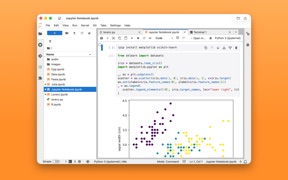
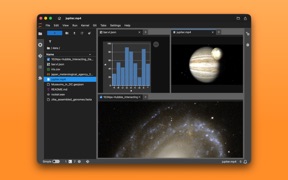
What does it look like?
Key features
Supports real-time execution of .ipynb files with compatibility for Python, Julia, R, and major frameworks like PyTorch and TensorFlow.
Allows users to arrange notebooks, editors, and terminals in a customizable, multi-panel layout.
Provides drag-and-drop file organization for various formats including CSV, JSON, Markdown, and images.
Includes an integrated shell terminal for managing packages and executing system-level commands.
How much does it cost?
Velocity
Who built it?
Kenneth Kao
13+ apps tracked · Developer Tools
 Macro Mode
 Manual Camera 4
 ShortFlow: Lockscreen Shortcut
 Webcam Recorder
 Audio Capture Pro
 UVC Capture - HDMI Monitor
 Voice Memos+
 Voice Memos for Apple Watch
 Reality Player
 Manual Move: Add Calories to Activity Ring
 MOV to MP4 Converter
 System Audio Recorder
User Sentiment
What do users think recently?
How are ratings & reviews evolving?
Not enough recent reviews to extract reliable themes yet.
Read the full review analysisCompetition
Competitive landscape for Desktop for Jupyter
How's the Developer Tools market?
The rivals identified
The Analyst's Read
Key takeaways for Desktop for Jupyter
Where is it heading?
Bottom line
This app simplifies the Jupyter experience by wrapping the JupyterLab interface into a dedicated, local macOS application.
Report last updated