


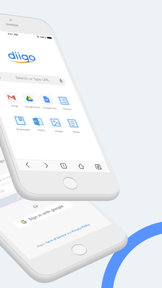
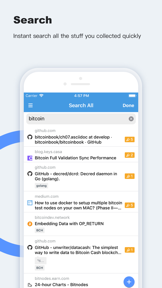


Diigo Browser is a productivity tool for iOS that allows users to save, annotate, and sync web bookmarks and PDF content.
Product velocity
Dormant
Daily rank 🇺🇸
—
Productivity
Sentiment
4.5
560 reviews
Nemesis
Fragmented field
The App DNA
What makes this app unique?
Researchers and information workers hire the app to maintain a persistent, annotated knowledge base across devices, but the current navigation friction prevents them from accessing their library efficiently.
For Researchers, students, and information workers who need to capture, annotate, and organize web-based content.
What does it look like?
Key features
Allows users to highlight text and attach sticky notes to web pages via a context menu trigger
Synchronizes saved bookmarks and annotations across devices via a centralized Diigo account
Enables viewing of PDF files directly within the browser interface
How much does it cost?
The app operates as a free utility with no visible monetization gates or subscription tiers.
Velocity
Dormant developmentopaqueShow more...
The app has been silent for over six years, with the last recorded update occurring in April 2020. There is no evidence of active development, feature releases, or maintenance patches. The project is classified as a zombie due to the complete lack of activity for well over the 12-month threshold.
Who built it?
User Sentiment
What do users think recently?
Fresh user feedback skews frustrated. Users appreciate core research and annotation functionality remains the primary driver for long-term power users, but report forced browser-first interface disrupts established workflows and adds unnecessary navigation steps.
How are ratings & reviews evolving?
What users say, by theme
- Core research and annotation functionality remains the primary driver for long-term power users
- Forced browser-first interface disrupts established workflows and adds unnecessary navigation steps
89 of 107 recent reviews analyzed · high confidence · Frustrated overall
Read the full review analysisUnlock 1 user request, each backed by review evidence.
Access the full report for freeCompetition
Competitive landscape for Diigo Browser
How's the Productivity market?
Diigo Browser maintains a 4.47 rating across 560 reviews, but the lack of updates since 2020 signals a stagnant position in the Productivity category.
Read the market outlookThe rivals identified
Unlock the deeper market read.
Access the full report for freeThe Analyst's Read
Key takeaways for Diigo Browser
Where is it heading?
The research and annotation market is consolidating around tools that offer frictionless capture and AI-driven synthesis, leaving Diigo Browser's manual, browser-centric model increasingly exposed. Without a shift to active maintenance and a library-first navigation, the app will continue to lose its high-value research audience to more modern alternatives.
- The lack of updates since 2020 leaves critical sync bugs unaddressed, which erodes user trust and accelerates churn among power users.
- The forced browser-first interface creates a persistent navigation barrier, preventing users from accessing their saved research efficiently.
The SWOT
- Proprietary annotation layer creates high switching costs
- Cross-device sync maintains research continuity
- Implement library-first launch toggle
- Add export functionality to external tools
Next best moves
Ship library-first launch toggle because it is the top-requested navigation fix → reduce churn
+ 1 more prioritized moveThe counter-intuitive read
The lack of monetization is not a missed…
Read the full takeFeature gaps
Bi-directional linking (available in NotePlan) +2
Since the last report: Sentiment has declined significantly due to navigation friction and sync-related data loss, forcing a shift in product priorities toward stability and UX basics.
Bottom line
Diigo Browser holds a loyal research base through its unique annotation layer, but the lack of maintenance and forced browser navigation drive churn, so the PM must prioritize a library-first launch toggle to stabilize the user base.
Unlock 3 critical frictions, 2 market threats, 1 more prioritized move and the analyst’s take.
Access the full report for freeReport last updated