


DIY Crafter - 3D woodworking


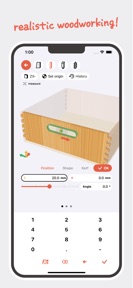
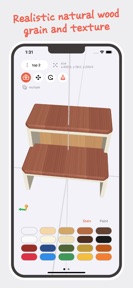
DIY Crafter is a 3D woodworking simulation app for DIY enthusiasts to plan and process projects on iOS.
The App DNA
What makes this app unique?
The app removes the cognitive friction of professional CAD software by mirroring real-world crafting steps like cutting and shaping.
For DIY enthusiasts and hobbyists who want to plan woodworking projects without the complexity of professional CAD software.
What does it look like?
Key features
Virtual shaping tools including saws, chisels, and drills for material modification.
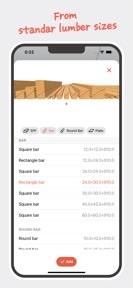
Cap on available materials for project construction, serving as a paid-tier gate.
How much does it cost?
The freemium model uses material quantity caps to gate project scale for free users.
Velocity
Maintenance developmentmonetizationUX improvementsShow more...
The app maintains a maintenance-level velocity, with only one release shipped in the last 70 days. Development is currently focused on minor technical adjustments and policy updates rather than new content or features. The latest release included a material limit for the free tier and cloud sync improvements, but the overall cadence remains slow. There is no evidence of a shift toward live-ops or frequent feature iteration.
Who built it?
Chizuru Kondo
4 apps tracked · Graphics & Design
 Knit Design - Japanese pattern
 Orange Chart - character maps
 Dot Marker - Stitch, Pixel art
User Sentiment
What do users think recently?
How are ratings & reviews evolving?
Not enough recent reviews to extract reliable themes yet.
Read the full review analysisCompetition
Competitive landscape for DIY Crafter - 3D woodworking
How's the Graphics & Design market?
DIY Crafter currently holds a #71 Grossing position in its category. The recent introduction of material limits for free users indicates a move to monetize project scale as the app matures.
Read the market outlookThe rivals identified
Unlock the deeper market read.
Access the full report for freeThe Analyst's Read
Key takeaways for DIY Crafter - 3D woodworking
Where is it heading?
The woodworking simulation market is consolidating around apps that offer both planning and social sharing. DIY Crafter is currently advantaged by its real-world tool simulation, but its maintenance-mode update cadence leaves it exposed to competitors who can iterate on social features faster.
- The 70-day update cadence indicates a maintenance-only posture, which limits the app's ability to respond to user feedback.
- The #71 Grossing rank suggests that the current material-limit gate is successfully converting a segment of the user base.
The SWOT
- Real-world crafting simulation (saws, chisels) differentiates DIY Crafter from abstract CAD tools.
- Community project sharing could drive organic install velocity.
Next best moves
Ship a community gallery feature because project sharing is a proven retention lever in design apps → increase session frequency
+ 1 more prioritized moveThe counter-intuitive read
The restrictive material cap is not just a monetization gate…
Read the full takeBottom line
DIY Crafter provides a unique simulation workflow, but the current 70-day update cadence risks stalling growth. Pivoting toward social features would unlock the retention loops necessary to compete against more active design apps.
Unlock 1 critical friction, 1 market threat, 1 more prioritized move and the analyst’s take.
Access the full report for freeFAQ
Is DIY Crafter suitable for professional woodworking design?
Does DIY Crafter require a subscription to access all materials?
What is the main difference between DIY Crafter and standard 3D modeling apps?
Sources
- [1] App Store
Report last updated