


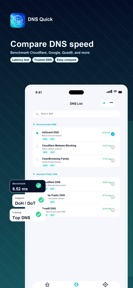

DNS Quick is a DNS settings manager for iOS, iPadOS, and macOS that allows users to benchmark and apply custom DNS configurations.
The App DNA
What makes this app unique?
The app removes the latency and privacy overhead of VPN-based DNS routing by providing a direct, system-level configuration interface for power users.
For Power users and network administrators on Apple platforms who require manual DNS configuration and performance testing.
What does it look like?
Key features
Measures response time and failure rates for DNS providers on the current network.
Provides quick access to saved DNS configurations directly from the macOS menu bar.
Allows manual entry and saving of specific DNS configurations for IPv4, IPv6, DoH, and DoT.
How much does it cost?
DNS Quick is distributed as a free utility with no account requirements, advertising SDKs, or third-party analytics.
Velocity
Active developmentUX improvementsplatform expansionShow more...
DNS Quick: DNS Settings currently maintains an active development pace, shipping two updates within the last 14 days. The latest release focuses on UX improvements, specifically enhancing the usability of the Mac interface through clickable sidebar elements and streamlined settings management. This follows a minor update released earlier in the month. Development appears stable and focused on iterative refinement of the user experience.
Who built it?
Roku Incorporated
2 apps tracked · Utilities
 Proxy Quick: SOCKS5 VPN
User Sentiment
What do users think recently?
How are ratings & reviews evolving?
Not enough recent reviews to extract reliable themes yet.
Read the full review analysisCompetition
Competitive landscape for DNS Quick: DNS Settings
How's the Utilities market?
DNS Quick operates as a specialized utility in the Apple ecosystem, focusing on manual DNS management rather than broad-market VPN services. The lack of monetization or analytics suggests a developer-led tool rather than a commercial-scale product.
The rivals identified
The Analyst's Read
Key takeaways for DNS Quick: DNS Settings
Where is it heading?
The market for manual DNS utilities remains stable, though increasingly constrained by Apple's platform-level security prompts. DNS Quick is well-positioned to serve power users as long as it maintains its performance-first, analytics-free stance.
- The active release cadence (two updates in two weeks) indicates a commitment to refining the macOS experience, which builds long-term user trust.
The SWOT
- macOS menu bar controls enable rapid configuration switching without leaving the primary workspace
- Zero-analytics, account-free design builds trust with privacy-conscious power users
- Adding a 'recommended for my region' preset based on latency data could lower the barrier for non-technical users
Next best moves
Ship automated latency-based DNS recommendations because users currently must manually benchmark each provider → increase adoption among non-technical users
The counter-intuitive read
The lack of monetization is a competitive advantage: by avoiding ad-SDKs…
Read the full takeSince the last report: The developer has pivoted from a passive maintenance stance to an active strategy of mitigating platform-level friction. This shift prioritizes automated recommendations to counter the limitations of manual DNS benchmarking.
Bottom line
DNS Quick provides a clean, privacy-focused utility for manual DNS control, but its manual-first design limits its reach. Automating the recommendation engine would unlock a broader user base by reducing the cognitive load of network benchmarking.
Unlock 2 critical frictions, 1 market threat and the analyst’s take.
Access the full report for freeFAQ
Is DNS Quick a VPN?
Does DNS Quick track my DNS queries?
Can I use custom DNS servers with DNS Quick?
Sources
- [1] App Store listing, source
Report last updated