


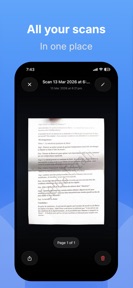

DocScanner: PDF Scan is a document scanning utility for iOS that converts physical paperwork into local PDF files.
The App DNA
What makes this app unique?
It removes the friction of account creation and cloud-sync requirements for users who need to digitize sensitive documents privately.
For Professionals, students, and freelancers who require a private, local-only document scanning tool on iOS.
What does it look like?
Key features
All scanned documents are saved directly to the device storage rather than a cloud server.
Camera-based scanning interface for digitizing physical receipts, contracts, and notes.
Converts captured images into standard PDF files for document sharing.
How much does it cost?
DocScanner: PDF Scan is currently distributed as a free utility with no visible monetization gates or subscription tiers.
Velocity
Maintenance developmentUX improvementsopaqueShow more...
The app currently ships at a maintenance cadence, with only one release recorded in the analyzed window. The latest version provided no specific feature details, focusing solely on minor UI improvements. Development appears to be in a stable, low-frequency state with no evidence of active feature expansion or live operations. The current release interval of 56 days confirms a maintenance-level velocity.
Who built it?
Youssef Dhibi
3 apps tracked · Productivity
 TN Bus Tickets
 Tricky Genie: 3 Wishes
User Sentiment
What do users think recently?
How are ratings & reviews evolving?
Not enough recent reviews to extract reliable themes yet.
Read the full review analysisCompetition
Competitive landscape for DocScanner: PDF Scan
How's the Productivity market?
DocScanner: PDF Scan occupies a niche privacy-focused segment within the Productivity category, relying on a 4.76 rating across 34 reviews to signal reliability. The lack of monetization gates contrasts with the subscription-heavy landscape of category leaders.
Read the market outlookThe rivals identified
Unlock the deeper market read.
Access the full report for freeThe Analyst's Read
Key takeaways for DocScanner: PDF Scan
Where is it heading?
The productivity scanning market is consolidating around subscription-based cloud platforms, leaving a gap for privacy-focused, local-only tools. DocScanner: PDF Scan remains advantaged in this niche as long as it avoids the feature bloat that forces competitors into cloud-reliant monetization models.
- The 56-day maintenance cadence indicates the developer is prioritizing stability over expansion, which limits growth but preserves the app's current privacy-focused value proposition.
The SWOT
- Local-first storage architecture ensures privacy compliance for sensitive documents.
- Zero-account requirement removes friction for casual users needing quick document capture.
- Introduce a one-time purchase Pro tier for advanced features like OCR or batch export to monetize the existing user base.
Next best moves
Audit user demand for OCR because the current feature set is limited to basic capture → increase utility for professional users.
The counter-intuitive read
The lack of cloud-sync is not a feature…
Read the full takeSince the last report: The product strategy shifted from a passive maintenance posture to an active evaluation of professional-grade features like OCR and batch export. This pivot acknowledges that the current feature set is insufficient for professional users, marking a departure from the previous focus on simple UI stability.
Bottom line
DocScanner: PDF Scan relies on a privacy-first, local-only mechanism that attracts users wary of cloud-based subscriptions. Maintaining this niche requires defending the local-storage promise against rivals that increasingly gate basic utility behind cloud-sync paywalls.
Unlock 2 critical frictions, 1 market threat and the analyst’s take.
Access the full report for freeFAQ
Is DocScanner: PDF Scan free to use?
Does DocScanner: PDF Scan store my documents in the cloud?
What are the main limitations of DocScanner: PDF Scan?
Sources
- [1] App Store, source
Report last updated