




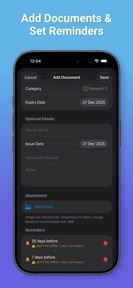

Document Expiry Reminder is an iOS utility for tracking and managing sensitive document expiration dates using on-device processing.
The App DNA
What makes this app unique?
The app removes the friction of managing sensitive personal records by eliminating the need for cloud accounts or internet connectivity.
For Users who require a private, offline-only solution for tracking sensitive document expiration dates.
What does it look like?
Key features
Extracts expiry dates from document images using Apple Vision framework without cloud processing.
Encrypts all stored documents and attachments locally on the device.
Triggers alerts for upcoming document expirations directly from the device.
How much does it cost?
The app is currently distributed as a free utility with no visible monetization gates or subscription tiers.
Velocity
Maintenance developmentinternationalizationShow more...
The app maintains a maintenance-tier cadence, shipping only one release in the analyzed window. With the latest update occurring 49 days ago, development activity remains infrequent. The most recent release focused on internationalization, expanding language support to include Romanian and Italian. There is no evidence of a shift toward live operations or high-frequency feature deployment.
Who built it?
MO NOUR
5 apps tracked · Productivity
 Credit Card Control
 Number Row Keyboard
 Dive Enhancer: Media Fix
 Hair Plan: Regrowth Tracker
User Sentiment
What do users think recently?
How are ratings & reviews evolving?
Not enough recent reviews to extract reliable themes yet.
Read the full review analysisCompetition
Competitive landscape for Document Expiry Reminder
How's the Productivity market?
Document Expiry Reminder occupies a niche, privacy-focused position in the Productivity category, maintaining a 5-star rating on the App Store. The absence of monetization gates distinguishes the app from broader document-management competitors.
Read the market outlookThe rivals identified
Unlock the deeper market read.
Access the full report for freeThe Analyst's Read
Key takeaways for Document Expiry Reminder
Where is it heading?
The productivity market for document management is consolidating around privacy-first tools, and Document Expiry Reminder is well-positioned to serve this segment. Continued focus on local-first reliability will maintain the app's standing against larger, cloud-dependent competitors.
- The latest release expanded language support, indicating the developer is actively maintaining the app for international users.
- The maintenance-only release cadence suggests a stable, feature-complete product that avoids the risks of frequent, potentially breaking, updates.
The SWOT
- On-device OCR removes connectivity dependency
- AES-256-GCM encryption provides defensible privacy barrier
- Localized pricing for advanced document management
Next best moves
Audit the local-backup export flow because users value data ownership → increase trust-based retention
+ 1 more prioritized moveThe counter-intuitive read
The app's lack of cloud synchronization is not…
Read the full takeSince the last report: Strategic priorities shifted from cross-platform expansion toward reinforcing data ownership and local-first reliability. The developer replaced the planned macOS companion app with a focus on auditing local-backup export flows to defend the privacy-conscious user base.
Bottom line
Prioritizing the offline-first, privacy-centric architecture defends the current user base against cloud-dependent competitors. Investing in robust data-export reliability will solidify the app's position as a trusted repository for sensitive documents.
Unlock 2 critical frictions, 1 market threat, 1 more prioritized move and the analyst’s take.
Access the full report for freeFAQ
Is Document Expiry Reminder safe for sensitive documents?
Does Document Expiry Reminder require an internet connection?
What is the difference between this and cloud-based document managers?
Sources
- [1] App Store, source
Report last updated