


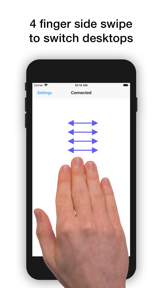
El Trackpad is a utility that converts iPhones and iPads into secondary Mac trackpads via wired USB connections.
The App DNA
What makes this app unique?
It removes the financial barrier to entry for users who need a secondary input device but wish to avoid purchasing dedicated hardware.
For Mac users seeking to repurpose existing iPhone or iPad hardware as a secondary input device for productivity.
What does it look like?
Key features
Enables trackpad-like inputs including pinch-to-zoom, rotate, and three-finger drag.
Direct wired connection eliminates input lag, establishing category authority.
Simulates native macOS trackpad inputs for Mission Control and Launchpad.
How much does it cost?
The freemium model uses a time-limited trial to demonstrate utility, followed by a permanent feature gate on multi-finger gestures.
Velocity
Dormant developmentperformanceShow more...
El Trackpad has seen no development activity for 1928 days. The project is effectively abandoned, as no feature updates, bug fixes, or operational changes have been recorded in over five years. The lack of recent releases confirms a zombie status with no signs of active maintenance or support.
Who built it?
User Sentiment
What do users think recently?
Review voice lately leans mixed. Users appreciate gesture controls replicate the native trackpad experience effectively for users transitioning from desktop environments and responsive developer support provides helpful guidance for users experiencing setup difficulties on older hardware.
How are ratings & reviews evolving?
What users say, by theme
- Gesture controls replicate the native trackpad experience effectively for users transitioning from desktop environments
- Responsive developer support provides helpful guidance for users experiencing setup difficulties on older hardware
- Mandatory wired connection limits usability for users who prefer wireless setups or distance from their displays
28 of 28 recent reviews analyzed · moderate confidence · Mixed overall
Read the full review analysisUnlock 2 more frustration themes and 2 user requests, each backed by review evidence.
Access the full report for freeCompetition
Competitive landscape for El Trackpad
How's the Utilities market?
El Trackpad serves a niche segment of Mac users, maintaining a 3.67-star rating across 39 total ratings. The lack of updates since May 2021 signals a maintenance-mode posture that limits competitive growth.
The rivals identified
The Analyst's Read
Key takeaways for El Trackpad
Where is it heading?
The market for secondary input utilities is consolidating around wireless-first solutions, leaving El Trackpad exposed due to its legacy wired dependency. Without a roadmap for wireless integration or OS-level compatibility updates, the app will likely see continued churn as users migrate to more flexible alternatives.
- The five-year development silence suggests the product is in maintenance mode, which increases the risk of breakage with future macOS updates.
- Persistent user requests for wireless connectivity remain unaddressed, which limits the app's appeal against more modern, portable input solutions.
The SWOT
- Wired USB connection eliminates input lag
- Native gesture simulation replicates Magic Trackpad workflow
- Wireless connectivity via Bluetooth removes primary adoption barrier
- Custom gesture mapping for professional design software
Next best moves
Audit gesture registration logic because users report scroll conflicts in the latest macOS → stabilize core input loop
+ 1 more prioritized moveThe counter-intuitive read
The lack of wireless connectivity is a feature, not a bug…
Read the full takeSince the last report: The outlook for El Trackpad has shifted from mixed to declining, as the five-year development hiatus is now framed as a critical risk to long-term viability rather than a simple maintenance-mode state.
Bottom line
El Trackpad delivers high-fidelity input simulation that retains core users, but the five-year development silence creates a technical debt risk that threatens the product's long-term viability.
Unlock 3 critical frictions, 2 market threats, 1 more prioritized move and the analyst’s take.
Access the full report for freeFAQ
Is El Trackpad compatible with all Mac models?
Does El Trackpad support wireless connection?
Is there a free version of El Trackpad?
Sources
- [1] App Store, source
Report last updated