


Elgato Control Center


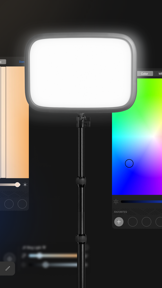
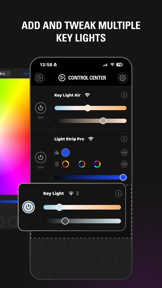
Elgato Control Center is a remote lighting management app for Key Light hardware, designed for content creators on iOS.
The App DNA
What makes this app unique?
The app removes the friction of manual lighting adjustments during video production by providing a centralized, remote-controlled interface for studio setups.
For Content creators and studio professionals using Elgato lighting hardware for video production.
What does it look like?
Key features
Adjusts brightness and power state via local network connection.
Controls multiple Key Light units individually or as a group.
How much does it cost?
The app functions as a free companion tool to drive hardware sales for the Elgato lighting product line.
Velocity
Maintenance developmentnew contentUX improvementsShow more...
The app maintains a maintenance-tier cadence, with only one release shipped in the last 44 days. Development is focused on hardware support and UX refinements rather than frequent feature iteration. The latest release introduced support for new hardware and a redesigned pairing flow, but the overall release frequency remains low. The project appears to be in a stable, mature state with infrequent updates.
Who built it?
Corsair Memory
6 apps tracked · Photo & Video
 Elgato Stream Deck Mobile
 SCUF App
 Elgato Stream Deck Connect
 Elgato Stream Deck Mobile
 Fanatec App
User Sentiment
What do users think recently?
Review voice lately leans frustrated. Users appreciate clean interface and adjustable lighting parameters provide a professional look for video conferencing and photography.
How are ratings & reviews evolving?
What users say, by theme
- Clean interface and adjustable lighting parameters provide a professional look for video conferencing and photography
- Frequent connection drops and pairing failures force users to manually reset hardware to restore control
49 of 49 recent reviews analyzed · high confidence · Frustrated overall
Read the full review analysisUnlock 2 more frustration themes and 2 user requests, each backed by review evidence.
Access the full report for freeCompetition
Competitive landscape for Elgato Control Center
How's the Photo & Video market?
Elgato Control Center maintains a 4.5-star rating across 3,803 reviews, serving as a critical utility for the Elgato hardware line. The lack of recent feature expansion suggests a maintenance-only posture that leaves power-user workflows vulnerable to regression.
Read the market outlookThe rivals identified
Unlock the deeper market read.
Access the full report for freeThe Analyst's Read
Key takeaways for Elgato Control Center
Where is it heading?
The market for studio lighting control is shifting toward integrated automation, yet Elgato Control Center is currently regressing in its core utility. Unless the team restores shortcut and widget functionality, the app will continue to lose favor with the power-user segment that defines the Elgato brand.
- Frequent connection drops and pairing failures force users to manually reset hardware, which erodes trust in the professional studio workflow.
- The removal of home screen widgets and broken shortcut integration disrupts established automation, leading to a spike in negative feedback.
The SWOT
- Direct hardware-to-app integration provides professional-grade control surface
- Multi-light synchronization enables complex studio group management
- Smart home platform integration addresses top automation requests
- Saved lighting profiles would improve multi-environment efficiency
Next best moves
Restore home screen widgets and shortcut triggers because their removal is the top frustration theme → reduce churn of power users
+ 1 more prioritized moveThe counter-intuitive read
The app's stability issues are a greater threat than feature gaps…
Read the full takeSince the last report: The report reflects a transition from a small-sample observation to a high-volume review dataset, confirming that technical regressions are actively damaging the brand's reputation among professional users.
Bottom line
Restoring widget and shortcut functionality is the immediate priority to stop the churn of power users, as these features are the primary mechanism for professional automation.
Unlock 3 critical frictions, 1 market threat, 1 more prioritized move and the analyst’s take.
Access the full report for freeFAQ
Is Elgato Control Center compatible with smart home platforms like HomeKit?
Does Elgato Control Center work if my lights are on a different network segment?
Can I save lighting presets to switch between work environments?
Sources
- [1] App Store
Report last updated