




Entangle is a free, open-source utility that turns an iPhone into a wireless trackpad and keyboard for Mac users over a local network.
The App DNA
What makes this app unique?
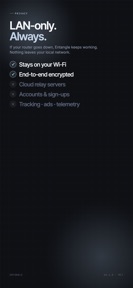
It removes the friction of cloud-based account setups and privacy concerns associated with third-party remote input tools by keeping all communication on the local network.
For Mac users seeking a free, privacy-focused, and local-only remote input device.
What does it look like?
Key features
Supports standard gestures including click, secondary click, two-finger scroll, and pinch.
Uses Bonjour for automatic discovery without cloud relay or account requirements.
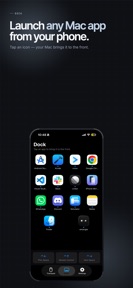
Displays and launches applications directly from the Mac's Dock via the iPhone interface.
How much does it cost?
Entangle operates as a free utility with no monetization, relying on optional GitHub sponsorships.
Velocity
Maintenance developmentopaqueShow more...
Entangle - Remote trackpad has seen no development activity since its initial launch 90 days ago. With only one version released in the observed window, the app is currently in a maintenance state. There are no indications of ongoing feature development or live operations support.
Who built it?
User Sentiment
What do users think recently?
Review voice lately leans excited.
How are ratings & reviews evolving?
What users say, by theme
- Cross-device connection failures between laptop and mobile apps prevent users from initiating or completing sessions
1 of 1 recent reviews analyzed · limited sample
Read the full review analysisCompetition
Competitive landscape for Entangle - Remote trackpad
How's the Utilities market?
Entangle occupies a niche within the Utilities category as a privacy-focused, open-source alternative to commercial remote-input tools. With a 4.0 rating based on a single review, the app currently lacks the scale to compete with established utilities, and the reported connection failures suggest it is not yet a reliable substitute for daily use.
Read the market outlookThe rivals identified
Unlock the deeper market read.
Access the full report for freeThe Analyst's Read
Key takeaways for Entangle - Remote trackpad
Where is it heading?
The remote-input market is consolidating around tools that offer stable, low-latency performance, which Entangle currently fails to provide due to connection handshake issues. Unless the developer resolves the local-network discovery failures, the app will remain a niche project rather than a viable alternative to established utilities.
- Connection handshake failures prevent users from initiating sessions, which erodes trust in the app's core utility.
- The three-month release gap indicates a maintenance-only cadence, leaving the app vulnerable to OS-level changes on macOS.
The SWOT
- Local-only Bonjour discovery eliminates cloud-relay dependencies
- Open-source architecture ensures privacy-first data handling
- Custom gesture-mapping interface would differentiate from standard utilities
Next best moves
Audit Bonjour handshake logic because connection failures are the primary blocker for new users → increase session success rate
The counter-intuitive read
The lack of cloud features is Entangle's primary strength…
Read the full takeBottom line
Entangle's privacy-first, local-only architecture is a strong differentiator, but the current connection failures invalidate its core function as a remote input device. Fixing the handshake protocol is the only move that will unlock user retention.
Unlock 2 critical frictions, 1 market threat and the analyst’s take.
Access the full report for freeFAQ
Is Entangle safe to use for my Mac?
How does Entangle compare to paid remote trackpad apps?
Does Entangle work if I am not on the same Wi-Fi?
Sources
- [1] App Store listing, source
Report last updated