



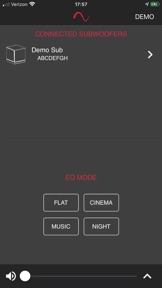


The Episode MEGA companion app provides remote control functionality for Episode MEGA subwoofers, allowing users to adjust audio settings directly from their listening position. It offers both manual volume control and specialized sound profiles to optimize performance for various media types.
Overview · Full Intel report in progress
The App DNA
What makes this app unique?
For Home audio enthusiasts and Episode MEGA subwoofer owners seeking convenient, remote sound customization.
What does it look like?
Key features
Allows users to fine-tune subwoofer volume levels remotely for a customized listening experience.
Includes preloaded modes such as Normal, Music, Cinema, and Night mode to quickly adjust bass characteristics.
Boosts frequencies around 50 Hz to provide a more dramatic bass effect for movie viewing.
Limits maximum volume output to maintain household quiet while still utilizing the subwoofer.
How much does it cost?
Velocity
Who built it?
Wirepath Home Systems
9 apps tracked · Music
 Luma View
 Luma Surveillance
 OvrC Connect
 OvrC
OvrC WPS-IP
 WPS-IP-HD
 WAKE Amp
 ClareVision Pro
User Sentiment
What do users think recently?
How are ratings & reviews evolving?
Not enough recent reviews to extract reliable themes yet.
Read the full review analysisCompetition
Competitive landscape for Episode MEGA Subwoofers
How's the Music market?
The rivals identified
The Analyst's Read
Key takeaways for Episode MEGA Subwoofers
Where is it heading?
Bottom line
This app serves as a dedicated remote interface for Episode MEGA subwoofers, focusing on ease of use and preset-based sound optimization.
Report last updated