


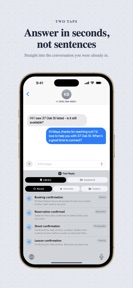




Fast Reply is a keyboard extension for iOS that allows users to insert saved text snippets and templates into any app.
The App DNA
What makes this app unique?
The tool removes the time-cost of typing repetitive messages, serving professionals who need to maintain consistent communication across multiple platforms without leaving their current interface.
For Professionals managing high-volume repetitive communication, including realtors, freelancers, and customer support staff.
What does it look like?
Key features
Custom keyboard extension allows insertion of saved text snippets into any app without leaving the current interface.
Triggers short codes like 'omw' to expand into full messages automatically while typing.
On-device rewording of snippets to adjust tone or length.
How much does it cost?
The freemium model anchors at $39.99 for lifetime access, gating advanced productivity features like autotext and sync behind a subscription or one-time purchase.
Velocity
Maintenance developmentUX improvementsShow more...
The app currently ships at a maintenance cadence, with only one release recorded in the analyzed window. Development is focused on UX improvements, specifically streamlining the initial setup and keyboard installation process for new users. The latest release provides step-by-step guidance and a sample reply to improve the onboarding experience. The current pace suggests a stable, low-frequency update cycle.
Who built it?
Aryaman Sharda
13+ apps tracked · Utilities
 Coffee Brew Ratio Calculator
 Word Search Universe
 Game Show Buzzer
 Pickleball Score Tracker
 Pulse - Website Uptime Monitor
 URL Scrubber – Strip UTMs
 Barbell Plate Racking Calc
 Cookie Blocker
 Resistor Color Band Calculator
 Walking Routes
 Bread Planner
 Auto Reloader: Page Refresher
User Sentiment
What do users think recently?
Review voice lately leans thrilled. Users appreciate business users find the app essential for managing repetitive text communication throughout their daily workflow and voiceover and accessibility support allows blind users to navigate and utilize the template features effectively.
How are ratings & reviews evolving?
What users say, by theme
- Business users find the app essential for managing repetitive text communication throughout their daily workflow
- Voiceover and accessibility support allows blind users to navigate and utilize the template features effectively
- Template viewing fails intermittently on iPhone, displaying blank screens instead of the expected saved content
5 of 5 recent reviews analyzed · limited sample
Read the full review analysisUnlock 1 more frustration theme and 1 user request, each backed by review evidence.
Access the full report for freeCompetition
Competitive landscape for Fast Reply: Saved Replies
How's the Utilities market?
Fast Reply occupies the productivity utility space on iOS, maintaining a 4.79 rating across 34 reviews. The current update cadence of one release every 14 days signals a maintenance-focused posture rather than aggressive feature expansion.
The rivals identified
The Analyst's Read
Key takeaways for Fast Reply: Saved Replies
Where is it heading?
The productivity utility market on iOS is consolidating around tools that offer deep system integration, and Fast Reply's keyboard-first approach is well-positioned for this. However, the current maintenance-level release cadence leaves the app vulnerable to technical regressions that could drive power users toward more stable alternatives.
- The latest release (v2.1.4) adds guided onboarding, which reduces the setup friction that often causes early-stage churn for keyboard-based utilities.
- Intermittent template rendering failures (blank screens) on iPhone erode the daily active habit, which compounds the technical frustration already visible in the review sample.
The SWOT
- Keyboard-integrated snippet insertion removes context-switching friction
- Voiceover support provides a barrier in accessibility-focused segments
- Adding image/logo attachment support addresses top user request
Next best moves
Audit template rendering logic because intermittent blank screens are the top frustration theme → reduce churn.
+ 1 more prioritized moveThe counter-intuitive read
The keyboard-first design is a double-edged sword…
Read the full takeBottom line
Fixing the template rendering bug is the priority, as it directly blocks the core utility for professional users. Addressing this stability issue will protect the conversion funnel from the free tier to the Pro subscription.
Unlock 2 critical frictions, 1 market threat, 1 more prioritized move and the analyst’s take.
Access the full report for freeFAQ
Is Fast Reply worth paying for if I only use it occasionally?
Does Fast Reply work in every app on my iPhone?
Is my typing data private when using the keyboard?
Sources
Report last updated