





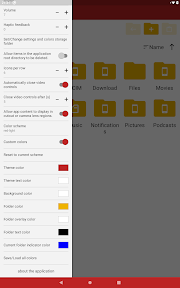
File Manager is a comprehensive utility for Android that enables users to perform standard file operations such as copying, moving, and deleting data. It distinguishes itself by integrating native media playback and document viewing capabilities, alongside support for various compression formats. The application offers a high degree of personalization through fully customizable interface colors.
Overview · Full Intel report in progress
The App DNA
What makes this app unique?
For Android users seeking a centralized, all-in-one tool for local file management and media consumption.
What does it look like?
Key features
Provides a full suite of management tools including copy, cut, paste, rename, and share functionality.
Includes built-in viewers for image, audio, video, and PDF files to eliminate the need for external applications.
Supports compression and decompression for .zip, .gz, .tar, and .tgz file formats.
Allows users to fully customize the application's color scheme.
How much does it cost?
Velocity
Maintenance developmentShow more...
5 versions in history. Development pace: maintenance.
Who built it?
Claire Mitchell
13+ apps tracked · Tools
 Pie Chart Maker by Grafi
 Sage: AI Recipe Generator
 Watch Faces Aesthetic Gallery
 Spring Aesthetic Wallpaper
 #1 Dirty Couple Spicy Sex Game
 Quit Vaping Tracker by Cease
 AI Chat Friend - GPT Chatbot
 Astral Essences
 Computer Chess
 Scatter Graph Maker
 Line Graph Maker
 Bar Chart Maker
User Sentiment
What do users think recently?
How are ratings & reviews evolving?
Not enough recent reviews to extract reliable themes yet.
Read the full review analysisCompetition
Competitive landscape for File Manager
How's the Tools market?
The rivals identified
The Analyst's Read
Key takeaways for File Manager
Where is it heading?
Bottom line
This is a versatile, free file management utility that combines standard file operations with built-in media playback and archive support.
Report last updated