


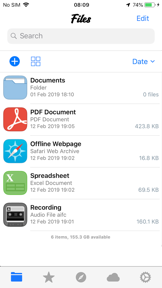
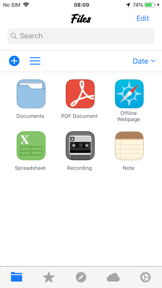

File Manager & Browser is a multi-platform utility for managing local, cloud, and network-attached storage files on iOS and Android.
The App DNA
What makes this app unique?
Users hire this app to consolidate fragmented storage locations into a single interface, reducing the friction of manual file organization across multiple cloud services.
For Android and iOS users seeking a centralized tool to manage local, cloud, and network-attached storage files.
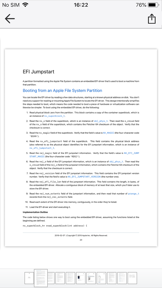
What does it look like?
Key features
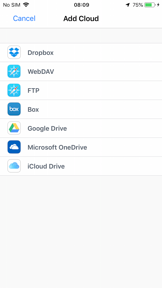
Direct access to Dropbox, OneDrive, Google Drive, Box, Yandex, and network-attached storage (NAS) within the file explorer
Visual breakdown of local storage usage to identify and remove large or redundant files
Enables file transfer between Android devices and desktop computers over a local network using FTP protocol
Built-in compression and decompression for ZIP, GZ, XZ, and TAR file formats
Subscription-based access to a collection of multiple apps under the developer's portfolio
How much does it cost?
Monetization relies on ad-supported free usage combined with a cross-app subscription bundle to capture recurring revenue.
Velocity
Maintenance developmentperformanceUX improvementsShow more...
The app has been effectively dormant for over a year, with the most recent release occurring in March 2026. Prior to this, there was a significant gap in development activity dating back to 2021. The latest release focused on minor functional adjustments and performance, following a long-term trend of infrequent, low-impact updates. There is no evidence of active development or live operations.
Who built it?
TapMedia
13+ apps tracked · Utilities
 QR Reader for iPhone
 QR Reader for iPhone (Premium)
 Scanner
 Chess ◧
 Barcode Reader for iPhone
 Translator »
 Weather ϟ
 Photo Editor Ⓞ
 Voice Changer
 Voice Recorder & Audio Editor
 Private Browser ⊘
 Magnifying Glass Ⓞ
User Sentiment
What do users think recently?
Fresh user feedback skews thrilled. Users appreciate intuitive file management interface allows users to organize and move data across storage categories easily and cross-platform network integration enables seamless file access from remote servers and cloud storage services, but report data loss incidents during folder-to-folder file movement cause significant frustration for long-term users.
How are ratings & reviews evolving?
What users say, by theme
- Intuitive file management interface allows users to organize and move data across storage categories easily
- Cross-platform network integration enables seamless file access from remote servers and cloud storage services
- High performance and reliability during file transfer operations maintain user trust over long-term usage
- Data loss incidents during folder-to-folder file movement cause significant frustration for long-term users
100 of 145 recent reviews analyzed · high confidence · Thrilled overall
Read the full review analysisUnlock 2 more frustration themes and 2 user requests, each backed by review evidence.
Access the full report for freeCompetition
Competitive landscape for File Manager & Browser
How's the Utilities market?
The app maintains a high rating of 4.65 on Android with over 1.6 million ratings, signaling strong utility-market penetration. However, the lack of recent feature updates compared to the 22 releases from Documents by Readdle suggests a defensive posture that risks long-term stagnation.
Read the market outlookThe rivals identified

By Readdle Technologies Limited
With 22 releases in the last six months and massive scale, this is the definitive feature-rich benchmark for iOS file management.
- Integrated VPN and browser-based download manager provides a comprehensive mobile office suite experience.
- Advanced PDF annotation and editing tools create a professional-grade workflow beyond simple file storage.
- Deep integration with local network protocols like SMB and WebDAV enables seamless desktop-to-mobile file syncing.


Unlock the head-to-head verdict: where this rival wins, and where it loses.
Access the full report for freeThe Analyst's Read
Key takeaways for File Manager & Browser
Where is it heading?
The utility market is consolidating around high-velocity competitors that offer advanced document-editing and AI-driven cleanup, leaving this app exposed if it remains in maintenance mode. The PM must transition from a stability-only focus to a feature-refresh cycle to prevent the current user base from migrating to more modern, feature-rich alternatives.
- Reports of data loss during file transfers erode user trust, which directly correlates with the negative sentiment seen in long-term user reviews.
- High baseline rating of 4.65 on Android indicates the core utility remains valuable to a massive user base despite the lack of frequent updates.
The SWOT
- Intuitive interface reduces cognitive load for basic organization
- Reliable performance history sustains long-term user trust
- Education partnerships as B2B distribution
- Integration of AI-driven storage cleanup
Next best moves
Audit file-transfer logic because data loss incidents are the top churn risk → stabilize long-term user trust
+ 1 more prioritized moveThe counter-intuitive read
The app's simplicity is its primary moat…
Read the full takeFeature gaps
Advanced PDF annotation and editing (available in Documents by Readdle) +2
Since the last report: The app shifted from a dormant state to active maintenance, introducing new features and monetization bundles while simultaneously suffering from critical user-reported data-loss issues.
Bottom line
The app maintains a strong utility base through reliable performance, but critical file-integrity issues and a lack of modern visual features like dark mode threaten its retention, so the PM should prioritize stability fixes over new feature expansion.
Unlock 3 critical frictions, 2 market threats, 1 more prioritized move and the analyst’s take.
Access the full report for freeReport last updated