


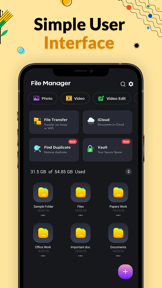


File manager - Document Editor is a dual-pane file management utility for iOS that supports local, cloud, and network storage.
The App DNA
What makes this app unique?
Users hire this app to organize and secure files across fragmented storage locations, but the current ad-heavy experience creates a trade-off between utility and usability.
For Mobile users needing to manage, compress, and secure files across local, cloud, and network storage.
What does it look like?
Key features
Displays two folders simultaneously to facilitate drag-and-drop style file operations, increasing ad-impression inventory.
Secures specific directories behind a subscription gate, serving as a direct paid-conversion lever.
Includes internal viewers to reduce user exit rates, increasing time-in-app and ad-inventory.
How much does it cost?
Freemium model gates privacy features and ad-removal behind a recurring subscription, with one-time payment options available.
Velocity
Steady developmentnew contentUX improvementsShow more...
The app currently ships at a steady cadence of approximately one release per month. Development is focused on expanding document management utility, specifically through the addition of PDF manipulation and file compression features. The latest update represents a major functional expansion rather than simple maintenance. This stable release pattern suggests a consistent development cycle focused on feature parity for document handling.
Who built it?
Bhalala Hiren Bharatbai
5 apps tracked · Utilities
 Photo Video Maker with song
 Arrow Master Puzzle
 Video Player: HD & All Format
 workout : fitness tracker Gym
User Sentiment
What do users think recently?
Review voice lately leans frustrated. Users appreciate the visual interface design provides a clean aesthetic experience for users managing their local media files.
How are ratings & reviews evolving?
What users say, by theme
- The visual interface design provides a clean aesthetic experience for users managing their local media files
- Frequent application crashes during startup or file searches render the software unusable for many mobile users
18 of 18 recent reviews analyzed · moderate confidence · Frustrated overall
Read the full review analysisUnlock 2 more frustration themes and 1 user request, each backed by review evidence.
Access the full report for freeCompetition
Competitive landscape for File manager - Document Editor
How's the Utilities market?
The app maintains a 4.46 rating across 720 reviews, but the high frequency of crash reports suggests the current stability is insufficient for a core utility tool.
Read the market outlookThe rivals identified
Unlock the deeper market read.
Access the full report for freeThe Analyst's Read
Key takeaways for File manager - Document Editor
Where is it heading?
The utility market is shifting toward high-performance, ad-light experiences, leaving this app exposed to churn. Unless the developer addresses the crash rate and ad-density, the current user base will migrate to more stable alternatives.
- Frequent startup crashes and search failures indicate technical debt that prevents core file management tasks, leading to negative user sentiment.
- Aggressive ad placement obscuring navigation icons creates a negative feedback loop that suppresses long-term retention and increases churn.
The SWOT
- Dual-pane interface facilitates complex file operations
- Expanding cloud storage integration could capture power users
Next best moves
Audit startup and search logic because crash reports are the top complaint → reduce churn
+ 1 more prioritized moveThe counter-intuitive read
The app's aggressive ad-monetization is not just a nuisance…
Read the full takeSince the last report: The app's functional state remains unchanged, but the analyst has updated the competitive assessment to characterize the aggressive ad-monetization as a deliberate, failing conversion strategy.
Bottom line
File manager - Document Editor provides a functional dual-pane utility, but frequent crashes and intrusive ad placement erode user trust, so the PM should prioritize stability fixes over new features to stabilize the current user base.
Unlock 2 critical frictions, 1 market threat, 1 more prioritized move and the analyst’s take.
Access the full report for freeSources
- [1] App Store, source
Report last updated