


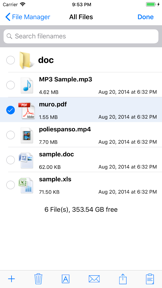
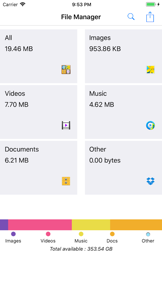
File Manager & File Viewer is a utility app for iPhone and iPad that enables manual browsing, viewing, and organizing of local media and document files.
The App DNA
What makes this app unique?
Users hire this app for offline, granular control over local storage that cloud-only services often obscure, though the lack of modern sync features limits its utility.
For iPhone and iPad users requiring a centralized interface to view and organize various document and media file types.
What does it look like?
Key features
Renders images, movies, audio, text, HTML, web archives, Microsoft Office, iWork, and PDF files within the app interface.
Provides a dedicated folder for direct file transfer between the device and desktop via iTunes.
Organizes local storage into specific file types accessible from the home screen.
How much does it cost?
The app is distributed as a free utility with no visible subscription or in-app purchase gates.
Velocity
Dormant developmentopaqueShow more...
The app has been inactive for over 99 months, far exceeding the threshold for a zombie classification. There is no evidence of ongoing development, feature updates, or maintenance. The last recorded update was a minor release focused on generic bug fixes, and no further activity has been detected since early 2018.
Who built it?
婷婷 乔
13+ apps tracked · Utilities
 Voice Box: AI Voice Changer
 Time Caps - A future diary
 中国象棋Simply Chinese Chess
 Msg Viewer Pro
 Tile-Matching
 Photo Widget-Live Pic Sharing
 Followers - Tracker Insight
 网上国网
网上国网 X IPTV Player Pro
 Chinese Chess - China game
 ICN SMARTPASS (인천공항 스마트패스)
 esimSubscription
User Sentiment
What do users think recently?
How are ratings & reviews evolving?
Not enough recent reviews to extract reliable themes yet.
Read the full review analysisCompetition
Competitive landscape for File Manager & File Viewer
How's the Utilities market?
The app occupies a legacy utility niche, holding a 3.2-star rating based on 9 total ratings. The lack of updates since 2018 signals a complete absence of competitive market positioning against modern, AI-driven storage tools.
Read the market outlookThe rivals identified

By Codespace Dijital Hizmetler Anonim Şirketi
This app competes by aggressively targeting the storage management segment, shifting the focus from manual file browsing to AI-automated cleanup and optimization.
- Leverages AI-driven storage analysis to automate cleanup tasks that require manual effort in our app.
- Includes a secure private vault feature, providing a critical privacy layer our current tool lacks.
- Offers video compression capabilities, directly addressing the primary pain point of large file storage.
 Unarchiver : Zip UnzipContender
 AppCleaner - Clean StorageContender
 Screenshotter - Manage your screenshotsContender
 Expert File ServicesContender
Unlock the head-to-head verdict: where this rival wins, and where it loses.
Access the full report for freeThe Analyst's Read
Key takeaways for File Manager & File Viewer
Where is it heading?
The utility market is consolidating around automated, cloud-integrated storage management tools. This app's failure to update since 2018 leaves it exposed to total market irrelevance, so the PM should prioritize a sunset strategy.
- The lack of updates since 2018 prevents the app from supporting modern iOS file-system changes, which accelerates user churn to active competitors.
- Competitors now offer AI-driven cleanup, making the manual-only approach of this app obsolete for the average user, which reduces new-user conversion.
The SWOT
- Granular manual file control [Segment: Power users]
- Broad legacy document format support [Segment: iWork/Microsoft users]
- Implement cloud-drive integration to reduce manual transfer friction [Market: Cloud-first storage]
- Add automated file-cleanup logic to compete with AI-driven rivals [Market: Storage management]
Next best moves
Pivot to cloud-sync integration because manual iTunes transfer is a legacy friction point → increase retention
+ 1 more prioritized moveThe counter-intuitive read
The app's greatest weakness, its lack of cloud connectivity…
Read the full takeFeature gaps
Cloud-drive integration (available in Screenshotter but absent here) +2
Since the last report: The intelligence report has been updated to include a more detailed competitive landscape featuring AI-driven storage tools and more specific SWOT analysis regarding the app's lack of automation.
Bottom line
The app is effectively abandoned, failing to meet modern storage expectations, so the PM should sunset the project to avoid further brand erosion.
Unlock 2 critical frictions, 2 market threats, 1 more prioritized move and the analyst’s take.
Access the full report for freeReport last updated