


Files Protection
By Binh Tran

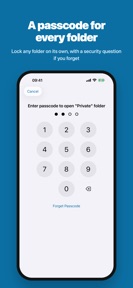


Files Protection is a local-only media and document vault for iPhone and iPad, securing files behind biometric or passcode authentication.
The App DNA
What makes this app unique?
The app removes the privacy cost of cloud-based storage by keeping sensitive files strictly on the user's device.
For iPhone and iPad users seeking a secure, local-only vault for private media and document management.
What does it look like?
Key features
Secures photos, videos, and documents behind 4 or 6-digit passcodes, custom alphanumeric codes, or Face ID/Touch ID.
Integrated web browser with download, bookmark, and history management for importing files directly into the vault.
Removes advertisements via a single in-app purchase.
How much does it cost?
The freemium model targets users who prefer one-time payments over subscriptions, relying on ad-supported free usage to drive conversion.
Velocity
Maintenance developmentUX improvementsplatform expansionShow more...
The app shows a maintenance-level cadence, with only one release shipped in the last 12 days and no further activity in the observed window. The latest version indicates a substantial effort, featuring a complete visual overhaul, expanded platform support for iPad and iPhone Duo, and functional improvements to the media player and security lock. Development appears focused on core architecture and UX refinements rather than a high-frequency release cycle. Future updates remain to be seen given the current lack of recurring release activity.
Who built it?
Binh Tran
12 apps tracked · Utilities
 Levain – Sourdough Companion
 Thuế thu nhập cá nhân 2026
 File Manager - Browser
 BatteryPro++
 Battery Testing
 Món ăn ngon mỗi ngày
 CampShhh
 Last Signal - Survival
 Tempo - AFib Companion
 SmallHold
 Chinese Mandarin Handwriting
User Sentiment
What do users think recently?
Fresh user feedback skews mixed. Users value the ability to secure private photos and videos within a protected environment.
How are ratings & reviews evolving?
What users say, by theme
- Users value the ability to secure private photos and videos within a protected environment
- The interface provides a straightforward way to manage and transfer media from the device gallery
- Application crashes on launch prevent users from accessing their stored photos and important documents
19 of 19 recent reviews analyzed · moderate confidence · Mixed overall
Read the full review analysisUnlock 2 more frustration themes and 2 user requests, each backed by review evidence.
Access the full report for freeCompetition
Competitive landscape for Files Protection
How's the Utilities market?
Files Protection holds a niche position in the Utilities category, serving users who prioritize local-only data security. The app's 4.6-star rating across 601 total ratings reflects a solid initial value proposition, though the recent stability reports suggest the current maintenance-mode cadence is failing to keep pace with user expectations.
Read the market outlookThe rivals identified
Unlock the deeper market read.
Access the full report for freeThe Analyst's Read
Key takeaways for Files Protection
Where is it heading?
The market for local-only privacy vaults is consolidating around apps that prioritize data integrity and reliable recovery paths. Files Protection remains exposed: the current maintenance-mode cadence is insufficient to address critical stability regressions, which will continue to erode the user base until a more aggressive support and stability loop is established.
- Launch-time crashes prevent users from accessing files, which compounds the churn pressure already visible in the recent review sample.
- Reports of data loss incidents after updates erode user trust, making it difficult to retain power users who store sensitive media.
The SWOT
- Biometric-locked vault mechanism ensures data remains on-device.
- Local-only storage architecture provides a privacy barrier against unauthorized access.
- Implementing a clear, accessible in-app support channel could mitigate negative sentiment.
- Adding support for animated image formats would improve media vault utility.
Next best moves
Audit launch-time crash logs because they are the top-reported frustration theme → restore access to stored files
+ 1 more prioritized moveThe counter-intuitive read
The app's maintenance-mode status is a strategic vulnerability: in the privacy-vault category…
Read the full takeBottom line
Files Protection provides a necessary privacy utility, but the current stability issues threaten the app's viability. Prioritizing launch-time reliability would address the primary churn driver and stabilize the user base, as the current data loss reports directly undermine the core value proposition.
Unlock 3 critical frictions, 2 market threats, 1 more prioritized move and the analyst’s take.
Access the full report for freeFAQ
Is Files Protection safe for storing sensitive photos?
How does Files Protection compare to cloud-based storage?
Is there a free version of Files Protection?
What should I do if I cannot access my files?
Sources
- [1] App Store
Report last updated