


Finger Painting


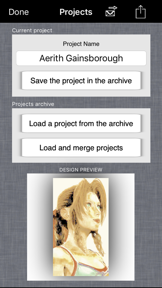


Finger Painting is a multi-touch freehand drawing and CAD tool for designers and technical users on iOS.
The App DNA
What makes this app unique?
The app removes the need for manual zoom-out during long-duration sessions by automatically expanding the work area when users reach screen borders.
For Designers and technical users requiring a portable, multi-touch CAD and freehand drawing environment.
What does it look like?
Key features
Multi-touch canvas supporting up to four fingers for dynamic drawing and previewing.
Work area expands automatically when the user reaches screen borders, removing the need for manual zoom-out.
Technical drawing tools including lines, rectangles, circles, and drawing grids.
How much does it cost?
The paid model at $0.99 provides full access to the drawing and CAD toolset without recurring subscription fees.
Velocity
Steady developmentShow more...
Who built it?
Gianluca Natalini
13+ apps tracked · Productivity
 Camera with Filters
 ArcadeBox
 Calcio a molla
 pdfManager
 voiceMessage PRO
 iFolders Safe
 FingerCAD HD
 FingerCAD
 tapeRecorder
 iWord PRO
 tapeRecorder HD
 FingerCAD PRO
User Sentiment
What do users think recently?
How are ratings & reviews evolving?
Not enough recent reviews to extract reliable themes yet.
Read the full review analysisCompetition
Competitive landscape for Finger Painting
How's the Productivity market?
Finger Painting operates in the productivity category as a specialized technical tool. The $0.99 price point positions it as a low-cost alternative to professional CAD software, though it lacks the ad-supported discovery funnel of casual drawing rivals.
Read the market outlookThe rivals identified
Unlock the deeper market read.
Access the full report for freeThe Analyst's Read
Key takeaways for Finger Painting
Where is it heading?
The market for technical drawing tools is consolidating around apps that offer both professional CAD features and low-friction entry points. Finger Painting remains exposed to ad-supported rivals that capture the casual-entry funnel, which will erode its market share unless the acquisition model shifts to a free-to-try tier.
- The app maintains a stable technical toolset, but the lack of recent feature expansion suggests a maintenance-mode development cadence.
The SWOT
- Multi-touch canvas supports four-finger dynamic previewing
- CAD toolset establishes a barrier against generic drawing apps
- Infinite canvas auto-pan removes manual zoom-out friction
- Localized CAD-tool tutorials could capture technical-student segments
Next best moves
Ship a free-to-try tier because the $0.99 entry barrier limits the user funnel → increase install velocity
The counter-intuitive read
The infinite canvas and auto-pan mechanism are not just features…
Read the full takeSince the last report: Finger Painting transitioned from a casual drawing tool to a technical CAD-focused productivity app. This shift emphasizes professional utility while identifying the $0.99 paid-upfront model as a primary barrier to user acquisition.
Bottom line
Finger Painting defends its technical-productivity niche with a specialized CAD toolset, but the paid-upfront model caps the user funnel against ad-supported alternatives. Prioritizing a free-to-try tier would address the acquisition friction currently limiting growth.
Unlock 2 critical frictions, 1 market threat and the analyst’s take.
Access the full report for freeFAQ
Is Finger Painting suitable for professional CAD work?
Does Finger Painting offer a free version?
How does Finger Painting compare to free drawing apps?
Sources
- [1] App Store
Report last updated