


Focus Lock: App Blocker Timer
By Tianfu New Area, Chengdu, Huayang, Burrito Software Development Studio
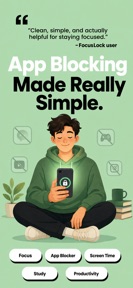


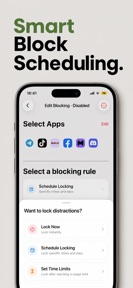
Focus Lock: App Blocker Timer is a privacy-focused utility for iOS that enforces system-level app blocking and scheduling.
The App DNA
What makes this app unique?
Users open Focus Lock: App Blocker Timer to remove the cognitive cost of manual willpower, replacing the temptation of social feeds with a motivational lock screen.
For Individuals seeking to manage digital distractions through strict, system-level app blocking and privacy-conscious tools.
What does it look like?
Key features
Uses Apple Screen Time API to enforce restrictions on app usage, deletions, and downloads.
Visual interface mimics a standard calculator to hide the app's function from casual observers.
Allows immediate bypass of lock screen via physical phone movement (shake or flip).
How much does it cost?
Subscription-only model for premium features, anchored by flexible duration options to lower the barrier to entry.
Velocity
Steady developmentUX improvementsopaqueShow more...
Focus Lock: App Blocker Timer maintains a steady development pace, shipping two updates over the last 30 days. The latest release focuses on general UX improvements, though the developer provides minimal detail regarding specific feature changes. This cadence suggests a stable, ongoing refinement process rather than rapid iteration or live-service operations. Development is currently focused on UX improvements and general product stability.
Who built it?
Tianfu New Area, Chengdu, Huayang, Burrito Software Development Studio
1 app tracked · Utilities
Explore the full publisher profileUser Sentiment
What do users think recently?
How are ratings & reviews evolving?
Not enough recent reviews to extract reliable themes yet.
Read the full review analysisCompetition
Competitive landscape for Focus Lock: App Blocker Timer
How's the Utilities market?
Focus Lock: App Blocker Timer competes in the Utilities category with a 5-star rating on the iOS platform. The subscription-only model positions the app against lower-cost, one-time purchase blockers, relying on the Screen Time API integration to justify the premium pricing.
Read the market outlookThe rivals identified
Unlock the deeper market read.
Access the full report for freeThe Analyst's Read
Key takeaways for Focus Lock: App Blocker Timer
Where is it heading?
The digital-wellbeing market is consolidating around system-level tools that provide reliable, non-bypassable blocking. Focus Lock: App Blocker Timer is well-positioned to serve users who prioritize privacy and discretion, provided the developer maintains parity with Apple's API updates.
- The steady release cadence of two updates in the last month demonstrates active maintenance and commitment to the current feature set.
- Focusing on stability and performance ensures the app remains a reliable utility, though it lacks the aggressive feature expansion seen in broader productivity tools.
The SWOT
- System-level blocking via Screen Time API provides a defensible barrier against overlay-based rivals.
- Calculator-disguise interface creates a differentiated capability for privacy-conscious segments.
- Localized pricing could capture high-ARPU segments in markets where the category norm is lower-cost, one-time purchase tools.
Next best moves
A/B test a one-time purchase option because the subscription-only model may be a conversion barrier → increase top-of-funnel conversion.
The counter-intuitive read
The calculator-disguise feature is not just a privacy tool…
Read the full takeBottom line
Focus Lock: App Blocker Timer relies on the Apple Screen Time API to provide a defensible utility, but the subscription-only model creates a conversion ceiling. Testing a one-time purchase option would unlock the segment currently deterred by recurring costs.
Unlock 1 critical friction, 1 market threat and the analyst’s take.
Access the full report for freeFAQ
Is Focus Lock: App Blocker Timer safe for kids?
How does Focus Lock: App Blocker Timer compare to free app blockers?
Is there a one-time purchase option for Focus Lock: App Blocker Timer?
Sources
- [1] App Store, source
Report last updated