



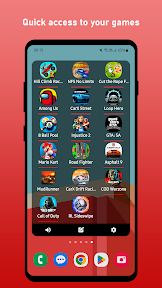


Game Launcher Widget is a game management tool for Android that provides home screen access via grid-based widgets.
The App DNA
What makes this app unique?
The app removes the cognitive cost of searching through large app libraries by providing a persistent, customized home screen shortcut.
For Android users who manage large game libraries and want to track their play time statistics directly from the home screen.
What does it look like?
Key features
Provides home screen access to installed games via 2x2, 3x3, or 4x4 grid widgets, expanding ad-inventory per active user.
Tracks total play time and session frequency across daily and weekly intervals, reinforcing the habit of checking game activity.
How much does it cost?
The freemium model relies on ad-supported free usage with additional monetization via in-app purchases.
Velocity
Maintenance developmentopaqueShow more...
Game Launcher Widget is currently in a maintenance phase, having shipped only one release in the last 132 days. Development activity is minimal, with no evidence of new features or live operations to sustain engagement. The lack of updates over this extended period suggests a focus on stability rather than active product evolution.
Who built it?
Digitraction
4 apps tracked · Tools
 My Ping Notes
 Links Widget
 SysFloat - Monitor FPS,CPU,GPU
User Sentiment
What do users think recently?
Review voice lately leans mixed. Users appreciate the launcher interface provides a clean aesthetic and useful widget controls for daily personalization.
How are ratings & reviews evolving?
What users say, by theme
- The launcher interface provides a clean aesthetic and useful widget controls for daily personalization
- Widget functionality fails to load or operate correctly following the latest operating system update
5 of 5 recent reviews analyzed · limited sample
Read the full review analysisUnlock 2 more frustration themes, each backed by review evidence.
Access the full report for freeCompetition
Competitive landscape for Game Launcher Widget
How's the Tools market?
Game Launcher Widget occupies a niche in the Tools category, currently holding a 3.5-star rating across 37 total platform ratings. The lack of recent feature updates and the reliance on a paywall for core features limit its ability to compete with system-level launchers.
Read the market outlookThe rivals identified

By SNEH NILESH
LaunchDock competes by providing advanced app launching capabilities and hidden activity access, appealing to the same power-user segment as this app.
- Supports Live Activities, providing dynamic, real-time information that static widgets cannot currently display.
- Enables access to hidden system activities, offering a level of control this app does not provide.



Unlock the deeper market read.
Access the full report for freeThe Analyst's Read
Key takeaways for Game Launcher Widget
Where is it heading?
The market for home screen personalization is consolidating around launchers that offer deep system integration and high-frequency updates. Game Launcher Widget remains exposed due to its lack of recent development and persistent stability issues, which will likely accelerate churn as users migrate to more reliable alternatives.
- Widget stability failures following system updates erode the daily habit, which compounds the rating drag already visible on the platform.
- The lack of feature updates for over 150 days signals maintenance-mode, leaving the app exposed to more active competitors.
The SWOT
- Grid-based widget layouts enable rapid access to large game libraries
- Localized pricing could reduce friction in cost-sensitive markets
Next best moves
Rebuild widget lifecycle logic because stability failures after system updates are the top churn risk → improve retention
+ 1 more prioritized moveThe counter-intuitive read
The app's maintenance-mode status is a strategic advantage: by avoiding feature bloat…
Read the full takeFeature gaps
Live Activities (available in LaunchDock but missing here) +1
Since the last report: The app's competitive outlook shifted from viewing maintenance as a liability to a potential advantage, while the SWOT analysis pivoted from feature-based opportunities to pricing-based market adjustments.
Bottom line
Users report: Game Launcher Widget must prioritize widget stability to retain its user base, as the current failure rate after system updates undermines the core value proposition. Addressing the perceived deception in the pricing model will further stabilize the user sentiment baseline.
Unlock 2 critical frictions, 1 market threat, 1 more prioritized move and the analyst’s take.
Access the full report for freeFAQ
Is Game Launcher Widget free to use?
How does Game Launcher Widget compare to Microsoft Launcher?
What is a good alternative to Game Launcher Widget?
Sources
- [1] Play Store listing, source
Report last updated