


Good Calendar - Schedule, Memo
By SOFTSEED
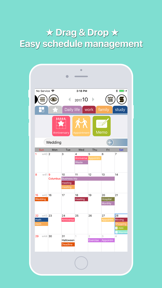


Good Calendar is a productivity tool for Android and iOS that combines drag-and-drop scheduling with diary and milestone tracking features.
The App DNA
What makes this app unique?
Users rely on the app to manage personal milestones and shift-based work schedules, displacing the need for separate diary and calendar applications.
For Users seeking a combined calendar and diary tool for personal milestone tracking and schedule management.
What does it look like?
Key features
Interface allows users to create and move calendar items via touch-and-drag gestures.
Users attach photos and notes to specific calendar dates to maintain a record of events.
Tracks specific milestones like anniversaries or birthdays with countdown timers.
How much does it cost?
The premium tier gates advanced features like unlimited categories and ad removal to drive conversion.
Velocity
Maintenance developmentperformanceplatform expansionShow more...
The app has been in a state of maintenance for an extended period, with the latest release occurring 19 days ago on Android following a multi-year gap since the last iOS update. The development cadence is extremely low, with only two distinct versions identified in the history. Recent updates are limited to technical compatibility requirements rather than functional improvements or new features. The project shows no signs of active feature development or live operations.
Who built it?
SOFTSEED
3 apps tracked · Productivity
 Good Calendar – Schedule, Memo
 Travel expense - Mint T Wallet
User Sentiment
What do users think recently?
The recent review mood reads mixed. Users appreciate color-coded event management allows users to organize complex work schedules with visual clarity and integration with google account services provides a convenient way to sync existing calendar data, but report event dates shift incorrectly on the calendar view, causing confusion and scheduling errors for users.
How are ratings & reviews evolving?
What users say, by theme
- Color-coded event management allows users to organize complex work schedules with visual clarity
- Integration with Google account services provides a convenient way to sync existing calendar data
- Event dates shift incorrectly on the calendar view, causing confusion and scheduling errors for users
51 of 51 recent reviews analyzed · high confidence · Mixed overall
Read the full review analysisUnlock 2 more frustration themes and 2 user requests, each backed by review evidence.
Access the full report for freeCompetition
Competitive landscape for Good Calendar - Schedule, Memo
How's the Productivity market?
Good Calendar maintains a 4.18-star rating on Android across 980 reviews, while the iOS version struggles with a 2.0-star rating from a small sample. The disparity suggests the product is currently optimized for Android, leaving the iOS user base underserved.
Read the market outlookThe rivals identified
Unlock the deeper market read.
Access the full report for freeThe Analyst's Read
Key takeaways for Good Calendar - Schedule, Memo
Where is it heading?
The productivity calendar market is consolidating around tools that offer cross-platform reliability and active feature development. Good Calendar remains exposed due to its maintenance-only cadence and critical stability issues, which will likely accelerate churn as users migrate to more stable alternatives.
- Persistent alarm and date-sync bugs erode user trust, which compounds the rating drag already visible on the iOS platform.
- The lack of feature updates over the last few years leaves the product in maintenance mode, making it vulnerable to active rivals.
The SWOT
- Drag-and-drop interface reduces friction for rapid schedule entry
- Localized holiday calendar expansion could capture underserved regional segments
Next best moves
Audit alarm and date-sync logic because persistent failures are the top-cited frustration theme -> improve retention
+ 1 more prioritized moveThe counter-intuitive read
The low iOS rating is not a failure of the app…
Read the full takeSince the last report: The report now highlights a stark performance gap between Android and iOS, prompting a strategic pivot toward sunsetting the underperforming iOS version to focus on Android stability.
Bottom line
Persistent alarm failures and date-shifting bugs invalidate the core utility of a calendar, suggesting that a pivot to stability hygiene is required to stop the churn of the existing user base.
Unlock 3 critical frictions, 1 market threat, 1 more prioritized move and the analyst’s take.
Access the full report for freeFAQ
Is Good Calendar reliable for setting important alarms?
Does Good Calendar work well on iOS?
What is the difference between the free and premium versions?
Are there better alternatives for calendar and diary tracking?
Sources
- [1] Play Store listing
Report last updated