


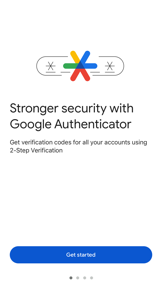

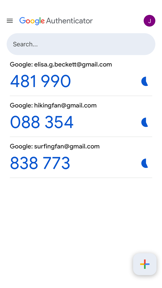


Google Authenticator is a security utility for generating time-based one-time passwords to protect online accounts on iOS and Android.
The App DNA
What makes this app unique?
Users hire the app to add a second layer of verification to their accounts, ensuring access remains secure even without network connectivity.
For Users seeking to secure online accounts with 2-step verification, specifically those already integrated into the Google Account ecosystem.
What does it look like?
Key features
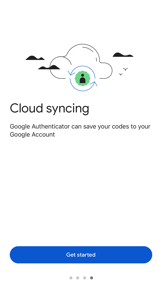
Backs up authentication codes to a Google Account for cross-device access
Requires biometric or screen lock authentication to open the app
Automates account configuration by scanning QR codes via camera
How much does it cost?
The app is provided at no cost as a utility to support the broader Google Account security infrastructure.
Velocity
Maintenance developmentUX improvementsperformanceShow more...
The app has released only 5 versions over the last 28 months, averaging approximately 0.04 releases per week, which falls well below the threshold for active development. While the latest release provided significant feature updates, the preceding history consists entirely of generic bug fixes. The development trend is stable but infrequent, focusing on long-term utility rather than rapid iteration or live operations. The current cadence suggests a maintenance-focused lifecycle.
Who built it?
13+ apps tracked · Utilities
 Google Family Link
 Google Earth
 YouTube Kids
 Google TV: Watch Movies & TV
 Google Docs
 Photomath
 Gboard – the Google Keyboard
 Google One
 Google Keep - Notes and lists
 Google News
 Snapseed: Photo Editor
 Google NotebookLM
User Sentiment
What do users think recently?
Fresh user feedback skews mixed. Users appreciate offline functionality allows users to generate authentication codes without active cellular or data service, but report account lockout risks arise when users fail to manually migrate tokens before replacing devices.
How are ratings & reviews evolving?
What users say, by theme
- Offline functionality allows users to generate authentication codes without active cellular or data service
- Account lockout risks arise when users fail to manually migrate tokens before replacing devices
100 of 182 recent reviews analyzed · high confidence · Mixed overall
Read the full review analysisUnlock 1 user request, each backed by review evidence.
Access the full report for freeCompetition
Competitive landscape for Google Authenticator
How's the Utilities market?
Google Authenticator holds the #3 Free position in the Utilities category (US), but the grossing rank lag signals that its utility-only model lacks the monetisation depth of identity-management competitors.
Read the market outlookThe rivals identified

By Microsoft Corporation
The primary direct rival offering identical TOTP functionality with robust cloud backup via Microsoft accounts and superior push-notification support.
- Integrated enterprise-grade push notification support
- Seamless Microsoft account cloud backup and sync



Unlock the head-to-head verdict: where this rival wins, and where it loses.
Access the full report for freeThe Analyst's Read
Key takeaways for Google Authenticator
Where is it heading?
The security utility market is consolidating around seamless, cloud-backed recovery experiences that reduce user anxiety during device transitions. Google Authenticator's reliance on manual export workflows leaves it exposed to competitors that offer frictionless migration, so the team must pivot to automated recovery to avoid losing its user base to more reliable alternatives.
- Synchronization errors in the latest update prevent third-party authentication, which erodes trust in the app's core reliability.
- The lack of automated cloud-native backup forces manual migration, causing permanent account loss and high-severity user frustration.
The SWOT
- Offline TOTP generation ensures reliability in all network environments.
- System-level Google Account integration simplifies onboarding.
- Biometric privacy screen reinforces security-first brand authority.
- Implement automated cloud-native token recovery.
- Expand wearable integration to match Apple Watch-native competitors.
Next best moves
Ship automated cloud-native token recovery because lockout complaints are the top churn driver → reduce account loss frustration.
+ 2 more prioritized movesThe counter-intuitive read
The app's #3 chart position is a liability…
Read the full takeFeature gaps
Cloud-native backup and restore (available in Microsoft Authenticator) +1
Since the last report: The app introduced long-requested cloud sync and privacy features, but the user base reports critical reliability issues and lockout risks that threaten retention.
Bottom line
Google Authenticator maintains its category lead through offline reliability, but the lack of automated cloud-native recovery is a critical vulnerability against Microsoft Authenticator, so the team must prioritize a seamless backup flow to prevent permanent user churn.
Unlock 3 critical frictions, 2 market threats, 2 more prioritized moves and the analyst’s take.
Access the full report for freeReport last updated