

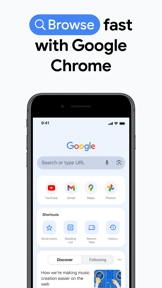






Google Chrome is a cross-platform web browser for mobile and desktop users, centered on search and account synchronization.
The App DNA
What makes this app unique?
Users hire Chrome to maintain a consistent browsing state across devices, relying on the Google account to bridge the gap between mobile and desktop workflows.
For General web users seeking a cross-platform browsing experience integrated with Google's search, security, and AI services.
What does it look like?
Key features
Search interface allowing users to attach open tabs, images, and files as context for AI-generated responses
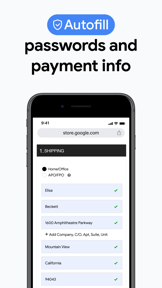
Built-in credential storage that generates, saves, and audits password strength across sites
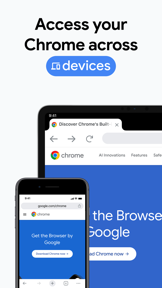
Synchronizes bookmarks, tabs, and passwords across mobile, desktop, and tablet devices via Google account sign-in
How much does it cost?
Browser is free to use, with monetization anchored in premium AI subscription tiers for advanced automation features.
Velocity
Active developmentUX improvementsplatform expansionShow more...
Google Chrome is shipping updates at a rate of approximately 0.6 releases per week, placing it firmly in the active tier. The development trend is stable, with a clear focus on cross-platform integration and user personalization features. While the Android release history shows generic stability improvements, the iOS builds consistently deliver tangible feature enhancements. The app is actively developed with a focus on browser utility and ecosystem synchronization.
Who built it?
13+ apps tracked · Utilities
 Google Family Link
 Google Earth
 YouTube Kids
 Google TV: Watch Movies & TV
 Google Docs
 Photomath
 Gboard – the Google Keyboard
 Google One
 Google Keep - Notes and lists
 Google News
 Snapseed: Photo Editor
 Google NotebookLM
User Sentiment
What do users think recently?
Review voice lately leans excited. Users appreciate reliable search performance and fast page loading speeds drive daily utility for mobile users, but report post-update stability issues including freezing and crashes disrupt the browsing experience on tablets.
How are ratings & reviews evolving?
What users say, by theme
- Reliable search performance and fast page loading speeds drive daily utility for mobile users
- Post-update stability issues including freezing and crashes disrupt the browsing experience on tablets
100 of 501 recent reviews analyzed · high confidence · Excited overall
Read the full review analysisUnlock 1 user request, each backed by review evidence.
Access the full report for freeCompetition
Competitive landscape for Google Chrome
How's the Utilities market?
Chrome holds the #2 Free position in the Utilities category, maintaining high visibility despite a 4.12 rating on Android. The gap between its high install base and the rising demand for privacy-first features signals a shift in user priorities toward ad-blocking utility.
Read the market outlookThe rivals identified

By Microsoft Corporation
The most direct Chromium-based rival that mirrors Chrome's ecosystem strategy by integrating a proprietary AI (Copilot) and deep cross-platform sync with Windows.
- Native integration of GPT-4 powered Copilot for web summarization and image generation
- Built-in 'Read Aloud' feature with highly natural neural voices
- Integrated shopping tools including automatic coupon application and price history
 Brave Browser & Search EngineContender
 DuckDuckGo, Duck.ai, & VPNContender
 Firefox: Private Web BrowserContender
 Opera: AI browser with VPNContender
Unlock the head-to-head verdict: where this rival wins, and where it loses.
Access the full report for freeThe Analyst's Read
Key takeaways for Google Chrome
Where is it heading?
The browser market is consolidating around privacy-first features and AI-driven utility, leaving Chrome exposed to competitors that offer native ad-blocking and integrated summarization. Chrome's reliance on its existing ecosystem moat is insufficient if stability regressions continue to degrade the core browsing experience for tablet users.
- Tablet stability regressions in the latest update erode the daily active habit, which compounds the rating drag already visible on Android.
- Integration of context-aware AI search features shows active investment in the browser's utility, moving beyond simple maintenance mode.
The SWOT
- Ecosystem network effects driven by multi-device sign-in
- Brand authority reinforced by proactive safety audits
- Expansion of privacy-focused controls to reduce churn
- Integration of native price-tracking to compete with Edge
Next best moves
Stabilize tablet performance because freezing reports are the top stability complaint → improve retention.
+ 1 more prioritized moveThe counter-intuitive read
Chrome's #2 chart position is a liability…
Read the full takeFeature gaps
Native ad-blocking (available in Brave and Opera but missing here) +2
Since the last report: Chrome shifted toward AI-integrated search and cross-platform utility, but experienced a material decline in sentiment due to tablet-specific stability regressions.
Bottom line
Chrome maintains its category lead through sticky ecosystem integration, but the lack of native ad-blocking and recent stability regressions create a churn risk to privacy-focused rivals, so the PM should prioritize tablet stability and privacy-tool development to defend the user base.
Unlock 3 critical frictions, 2 market threats, 1 more prioritized move and the analyst’s take.
Access the full report for freeFAQ
Is Google Chrome safe for privacy-conscious users?
How does Chrome compare to Microsoft Edge?
Does Chrome have a built-in ad blocker?
Report last updated