


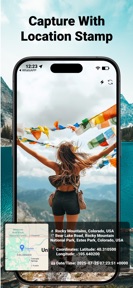



GPS Camera Timestamp Photo is a utility for iOS that embeds GPS coordinates, addresses, and map snippets into photos for professional field documentation.
The App DNA
What makes this app unique?
Field professionals use this to replace manual photo annotation, removing the cognitive cost of tracking site visit locations and times.
For Field engineers, construction professionals, and logistics personnel requiring verifiable, location-stamped photo documentation.
What does it look like?
Key features
Embeds latitude, longitude, and address data directly onto image files at the moment of capture.
Visualizes the capture location via map snippets integrated into the photo frame.
Maintains map functionality and location data retrieval during poor network conditions or offline field work.
How much does it cost?
The freemium model gates advanced features behind a Pro tier, evidenced by the presence of a Pro screen in the latest update.
Velocity
Maintenance developmentUX improvementsperformanceShow more...
The app currently operates on a maintenance cadence, with only one release shipped in the last 53 days. Development is focused on UX improvements, including a redesigned interface for the library and settings, alongside technical refinements for network and location stability. The lack of frequent updates suggests a focus on periodic maintenance rather than rapid feature iteration. Future updates are expected to continue this pattern of infrequent, stability-oriented releases.
Who built it?
Awais Mobeen
2 apps tracked · Photo & Video
 Design Studio For Crafting
User Sentiment
What do users think recently?
How are ratings & reviews evolving?
Not enough recent reviews to extract reliable themes yet.
Read the full review analysisCompetition
Competitive landscape for GPS Camera Timestamp Photo
How's the Photo & Video market?
GPS Camera Timestamp Photo occupies a niche utility role within the Photo & Video category, currently holding a 5-star rating based on a limited sample of three reviews. The lack of significant chart momentum indicates the app serves a specialized, low-volume professional segment rather than a mass-market audience.
Read the market outlookThe rivals identified
Unlock the deeper market read.
Access the full report for freeThe Analyst's Read
Key takeaways for GPS Camera Timestamp Photo
Where is it heading?
The utility-photo market is consolidating around apps that offer integrated cloud-sync and team-sharing features. GPS Camera Timestamp Photo remains in a stable, maintenance-focused state, which leaves it exposed to rivals that offer more robust professional workflows.
- The maintenance-only release cadence indicates a stable, low-investment posture that prioritizes basic stability over aggressive feature expansion.
- Offline map loading functionality provides a specific utility advantage for field-based users, creating a barrier to entry for cloud-dependent rivals.
The SWOT
- Offline map loading enables field work in low-connectivity zones.
- Map location overlay provides immediate visual context for site inspections.
- Automated cloud-sync workflows could improve professional reporting utility.
Next best moves
Audit Pro tier conversion funnel because the current maintenance cadence suggests low revenue velocity → increase ARPU
The counter-intuitive read
The app's lack of mass-market appeal is a strength…
Read the full takeSince the last report: The analysis has shifted from viewing the app's maintenance-only cadence as a stability-focused strategy to identifying it as a primary competitive weakness. This change in perspective is reflected in the updated SWOT analysis and the pivot in PM action items toward conversion optimization.
Bottom line
GPS Camera Timestamp Photo provides essential field-documentation utility, but the current maintenance-only cadence limits its competitive edge; focusing on conversion optimization would better leverage its existing professional feature set.
Unlock 2 critical frictions, 1 market threat and the analyst’s take.
Access the full report for freeFAQ
Is GPS Camera Timestamp Photo suitable for professional construction site documentation?
Does GPS Camera Timestamp Photo work without an internet connection?
What is the difference between the free and Pro versions?
Sources
- [1] App Store, source
Report last updated