




Haptic Pen is a tactile feedback editor for iOS developers and designers to prototype haptic patterns via touch and audio conversion.
The App DNA
What makes this app unique?
The tool removes the technical friction of manual haptic implementation in Xcode by providing a visual sandbox for testing feedback before shipping.
For iOS developers, UI/UX designers, and indie makers building tactile app experiences.
What does it look like?
Key features
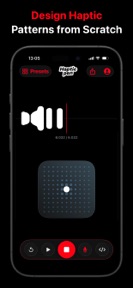
Design custom tactile feedback patterns by drawing directly on the touch pad.
Convert audio files, clicks, beats, and voice recordings into haptic samples.
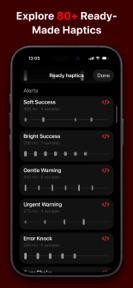
Access 80+ ready-made tactile presets for common UI states like alerts and warnings.
How much does it cost?
Haptic Pen is currently offered as a free utility with no visible subscription or IAP gates.
Velocity
Maintenance developmentopaqueShow more...
With only one release shipped in the last 86 days, the development cadence is currently in a maintenance phase. The app has not received any updates since its debut, indicating a lack of active feature iteration or live operations. Future development remains uncertain given the absence of subsequent patches or content drops since the initial version.
Who built it?
User Sentiment
What do users think recently?
How are ratings & reviews evolving?
Not enough recent reviews to extract reliable themes yet.
Read the full review analysisCompetition
Competitive landscape for Haptic Pen: Feedback Studio
How's the Utilities market?
Haptic Pen serves a specialized developer-tooling niche within the iOS Utilities category. The absence of a monetization model or recent update activity indicates a low-intensity market position compared to active commercial developer tools.
Read the market outlookThe rivals identified
Unlock the deeper market read.
Access the full report for freeThe Analyst's Read
Key takeaways for Haptic Pen: Feedback Studio
Where is it heading?
The developer-tooling market for haptics is consolidating around native documentation and AI-assisted workflows. Haptic Pen remains a niche utility, but its long-term viability depends on a shift to an active update cadence to maintain platform relevance.
- The 87-day update gap indicates a maintenance-only lifecycle, which limits the tool's ability to keep pace with evolving iOS haptic APIs.
The SWOT
- Audio-to-haptic conversion mechanism reduces prototyping time
- Touch-pad drawing interface provides a tactile design workflow
- 80+ ready-made haptic presets lower the barrier for developers
- Implementing a Pro tier for advanced export formats
- Adding direct integration with common design software
Next best moves
Audit current codebase against latest iOS SDK because the tool has been dormant for 87 days → prevent future breakage
The counter-intuitive read
The lack of monetization is the primary risk: without revenue…
Read the full takeBottom line
Haptic Pen offers a functional sandbox for tactile prototyping, but the lack of update cadence limits its utility for professional workflows. Ensuring platform compatibility would preserve the tool's value for the existing user base.
Unlock 3 critical frictions, 2 market threats and the analyst’s take.
Access the full report for freeFAQ
Is Haptic Pen suitable for professional UI/UX design?
Does Haptic Pen require a subscription?
What are the limitations of Haptic Pen?
Sources
- [1] App Store, source
Report last updated