


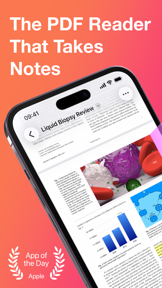
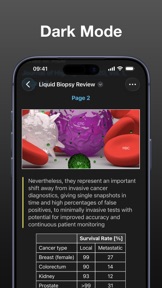

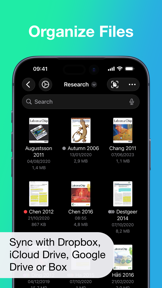
Highlights is a lightweight PDF reader and annotation tool for students and academics, available on iOS.
The App DNA
What makes this app unique?
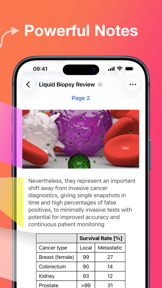
Users hire Highlights to convert passive PDF reading into structured, exportable research notes, minimizing the friction between document analysis and writing.
For Students, academics, and researchers who perform heavy PDF-based reading and require structured note extraction.
What does it look like?
Key features
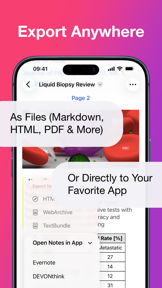
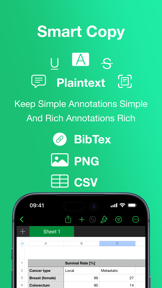
Converts PDF annotations into specific formats including CSV for tables and BibTex for citations.
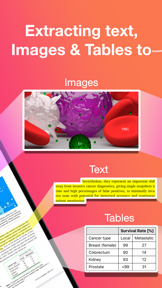
Extracts text and table data from non-searchable PDFs using on-device machine learning.
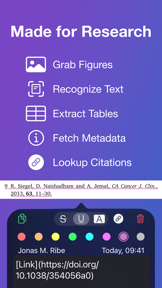
Fetches DOI links and metadata for scientific references.
How much does it cost?
The freemium model gates advanced research-specific productivity tools behind a subscription while keeping core PDF reading free.
Velocity
Maintenance developmentUX improvementsaccessibilityShow more...
The app currently ships at a maintenance-level cadence, with only one release identified in the last six months. While the latest version provided a significant UX improvement regarding PDF readability, the lack of frequent updates suggests a focus on stability or long-cycle development rather than rapid iteration. The development trend is stable but slow, with no evidence of live-ops or high-frequency feature deployment.
Who built it?
User Sentiment
What do users think recently?
Recent user voice shows a mixed sentiment. Users appreciate cross-device synchronization allows academic researchers to maintain consistent annotation workflows between mobile and desktop environments and markdown export functionality provides significant value for organizing research notes and extracting data from documents, but report subscription-only pricing model creates long-term financial friction for students and academics on fixed budgets.
How are ratings & reviews evolving?
What users say, by theme
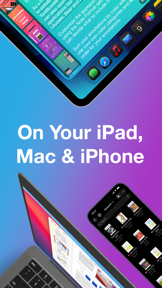
- Cross-device synchronization allows academic researchers to maintain consistent annotation workflows between mobile and desktop environments
- Markdown export functionality provides significant value for organizing research notes and extracting data from documents
- Subscription-only pricing model creates long-term financial friction for students and academics on fixed budgets
62 of 310 recent reviews analyzed · high confidence · Mixed overall
Read the full review analysisUnlock 1 more frustration theme and 1 user request, each backed by review evidence.
Access the full report for freeCompetition
Competitive landscape for Highlights: PDF Reader & Notes
How's the Productivity market?
Highlights maintains a 4.54 rating across 1,561 total ratings, positioning it as a high-utility tool for research-heavy users. The focus on lightweight performance differentiates it from enterprise-grade suites, though the lack of stylus support restricts its reach in technical fields.
Read the market outlookThe rivals identified

By Beijing Yunsi Software Technology Co., Ltd
MarginNote 3 is the primary nemesis because it dominates the academic research niche by transforming PDF reading into a structured knowledge-management workflow, directly competing for Highlights' power-user base.
- Integrates complex mind-mapping and outlining tools directly into the PDF reading and annotation interface
- Provides advanced FSRS spaced repetition algorithms that turn passive reading into active study sessions
- Offers robust Anki export functionality, creating a powerful data-driven lock-in for academic researchers
 Markup - Web HighlighterContender
 Save to Raindrop.ioContender
 Markup UltimateContender
 GoodReader Pro PDF EditorContender
Unlock the head-to-head verdict: where this rival wins, and where it loses.
Access the full report for freeThe Analyst's Read
Key takeaways for Highlights: PDF Reader & Notes
Where is it heading?
The academic research market is consolidating around tools that bridge the gap between PDF reading and structured note-taking. Highlights is well-positioned to capture the lightweight-tool segment, but technical instability and the lack of stylus support leave it vulnerable to rivals that offer more comprehensive study environments.
- Frequent crashes during annotation sessions disrupt the core research workflow, which compounds the negative sentiment already present in the user base.
- The commitment to Markdown-first export workflows aligns with the growing Obsidian and Notion user bases, creating a sustainable retention loop for academic researchers.
The SWOT
- Lightweight 10MB footprint enables faster launch times than complex study suites
- Markdown-first export architecture integrates into modern research stacks
- Education-focused B2B partnerships could provide a stable distribution channel
- Native stylus support would capture the technical-academic segment
Next best moves
Ship native Apple Pencil support because it is the top-requested feature for technical users → increase conversion in STEM segments
+ 1 more prioritized moveThe counter-intuitive read
The app's lightweight 10MB footprint is its primary moat…
Read the full takeFeature gaps
Integrated mind-mapping (available in MarginNote 3 but absent here) +2
Since the last report: The app maintains its core value proposition, but increased user feedback volume has lowered confidence scores and highlighted persistent stability and feature gaps.
Bottom line
Highlights wins on lightweight performance for researchers, but the lack of stylus support and subscription-only pricing limits its growth among technical students, so the PM should prioritize Apple Pencil integration to unlock the STEM segment.
Unlock 3 critical frictions, 2 market threats, 1 more prioritized move and the analyst’s take.
Access the full report for freeFAQ
Is Highlights good for students with a limited budget?
How does Highlights compare to MarginNote 3?
Does Highlights support Apple Pencil for handwriting?
What is a free alternative to Highlights for PDF research?
Report last updated