


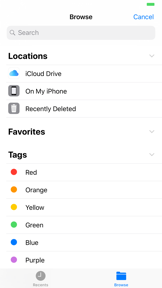


iEditor is a free text and source code editor for iPhone and iPad, supporting syntax highlighting and multi-format file viewing.
The App DNA
What makes this app unique?
Users hire iEditor for basic, offline file management and code viewing on mobile devices, avoiding the complexity of full-scale IDEs.
For Developers and students requiring a lightweight, mobile-based text and source code editor for basic file management.
What does it look like?
Key features
Color-coded text rendering for C, Java, and HTML files.
Support for viewing DOC, EXCEL, PPT, PDF, and media files.
Importing files from local storage and external locations.
How much does it cost?
The app is distributed as a free utility without explicit in-app purchase or subscription gates.
Velocity
Dormant developmentopaqueShow more...
The app has not received a feature update or bug fix in approximately 285 days, placing it well outside the threshold for active development. The latest release provided only platform compatibility updates and generic performance improvements. Given the lack of activity over the past nine months, the development momentum is currently stagnant.
Who built it?
ComcSoft
12 apps tracked · Productivity
 iZip Pro -Zip Unzip Unrar Tool
 iNetTools - Ping,DNS,Port Scan
 iTerminal Pro – SSH Telnet
 iEditor Pro – Text Code Editor
 Power PDF Pro
 iTerminal - SSH Telnet Client
 iZip – Zip Unzip Unrar
 iTransfer - File Transfer Tool
 Power Photo – Photo Processing
 iTransfer Pro
 iNetTools - Pro
User Sentiment
What do users think recently?
How are ratings & reviews evolving?
Not enough recent reviews to extract reliable themes yet.
Read the full review analysisCompetition
Competitive landscape for iEditor – Text Code Editor
How's the Productivity market?
iEditor maintains a niche position as a free, offline-first file utility, but its 9-month update gap limits its competitive stance against modern, cloud-integrated productivity tools.
Read the market outlookThe rivals identified
Unlock the deeper market read.
Access the full report for freeThe Analyst's Read
Key takeaways for iEditor – Text Code Editor
Where is it heading?
The mobile productivity market is consolidating around cloud-native workflows, and iEditor's offline-first architecture is increasingly out of step with user expectations. Without a pivot to cloud-sync, the app will likely see a steady decline in active users as workflows migrate to integrated, multi-platform environments.
- The 9-month update silence suggests the app is in maintenance mode, which will likely lead to user churn as competitors release cloud-integrated features.
The SWOT
- Cross-format file viewer supports DOC, EXCEL, and media files.
- Syntax highlighting for C, Java, and HTML provides essential utility.
- Cloud-storage integration would address the primary friction point for mobile developers.
Next best moves
Invest in cloud-storage integration because it is the top missing feature for mobile productivity → increase user retention.
+ 1 more prioritized moveThe counter-intuitive read
The app's lack of cloud-sync is not just a feature gap…
Read the full takeSince the last report: The competitive outlook has shifted from stable to declining as the app's lack of development and cloud-sync integration becomes a more critical liability against active competitors.
Bottom line
iEditor offers a stable, free utility for basic file viewing and editing, but the lack of cloud integration and long-term maintenance status makes it a poor choice for professional workflows, so the developer should prioritize cloud-sync to remain relevant.
Unlock 2 critical frictions, 1 market threat, 1 more prioritized move and the analyst’s take.
Access the full report for freeFAQ
Is iEditor free to use?
Does iEditor support cloud storage?
What file formats can iEditor open?
Sources
- [1] App Store, source
Report last updated