


iFrame - Frame Screenshots
By INII Co.





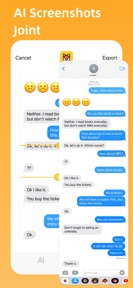


iFrame is a design utility for iOS that applies device frames to screenshots and stitches chat history into long images.
The App DNA
What makes this app unique?
The app removes the manual friction of cropping and framing screenshots for professional marketing assets, displacing the need for desktop-based design software.
For Content creators, UI designers, and app developers.
What does it look like?
Key features
Applies device-specific frames to screenshots and recordings with customizable backgrounds.
Automated joining of screenshots with intelligent status bar detection.
Generates promotional posters for app distribution.
How much does it cost?
Freemium model gates advanced AI-stitching and Pro features behind a recurring subscription managed via iTunes.
Velocity
Maintenance developmentUX improvementsperformanceShow more...
The app currently ships at a maintenance cadence, with only one release recorded in the analyzed window. Development is focused on technical refinements, specifically optimizing image stitching algorithms and resolving stability issues during high-resolution processing. The current pace of one update every 45 days suggests a focus on long-term stability rather than rapid feature expansion. No new content or major feature additions have been introduced in the most recent update.
Who built it?
INII Co.
5 apps tracked · Utilities
 Dev Widgets: Check your sales
 ColorCard: Palette Tool
 Progress 2.0
 JING Focus - Calm Down & Focus
User Sentiment
What do users think recently?
Recent user voice shows a mixed sentiment. Users appreciate the design interface provides a convenient and efficient way to create promotional graphics for applications and the application offers a comprehensive set of features that remain useful for long-term design projects.
How are ratings & reviews evolving?
What users say, by theme
- The design interface provides a convenient and efficient way to create promotional graphics for applications
- The application offers a comprehensive set of features that remain useful for long-term design projects
- Users report that previously free features are now locked behind a subscription paywall, causing frustration
4 of 4 recent reviews analyzed · limited sample
Read the full review analysisUnlock 1 user request, each backed by review evidence.
Access the full report for freeCompetition
Competitive landscape for iFrame - Frame Screenshots
How's the Utilities market?
iFrame operates in the Utilities category, maintaining a 4.6-star rating across its limited review sample. The app's focus on AI-assisted stitching differentiates it from generic screenshot tools, though the recent shift to subscription-only features has impacted user sentiment.
Read the market outlookThe rivals identified
Unlock the deeper market read.
Access the full report for freeThe Analyst's Read
Key takeaways for iFrame - Frame Screenshots
Where is it heading?
The market for mobile design utilities is consolidating, with users favoring apps that offer automated, high-fidelity output. iFrame's ability to maintain its lead depends on balancing its subscription monetization with consistent updates for new hardware, as the current maintenance-level cadence leaves it exposed to faster-moving rivals.
- The transition of free features to a subscription model has triggered negative sentiment, which could accelerate churn among casual users.
- The latest release of the AI-stitching algorithm demonstrates active feature investment, maintaining the app's utility for professional content creators.
The SWOT
- AI-assisted stitching logic automates status bar removal
- App poster templates provide a professional distribution utility
- Localized pricing strategies in high-ARPU markets
- Creator-referral loops to incentivize content sharing
Next best moves
Ship support for larger device screen sizes because users report compatibility issues on modern hardware → increase user retention
+ 1 more prioritized moveThe counter-intuitive read
The shift to a subscription model is a necessary survival mechanism for iFrame…
Read the full takeBottom line
iFrame's AI-stitching mechanism provides a clear retention lever for professional users, but the aggressive paywall transition risks alienating the core base. Addressing device-size compatibility will stabilize the user experience and protect the app's utility against emerging design tools.
Unlock 2 critical frictions, 2 market threats, 1 more prioritized move and the analyst’s take.
Access the full report for freeFAQ
Is iFrame free to use?
Does iFrame work on the latest iPhone models?
What is the difference between iFrame and basic screenshot editors?
Are there free alternatives to iFrame?
Sources
- [1] App Store
Report last updated