





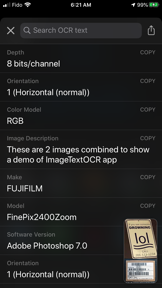
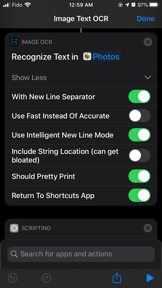


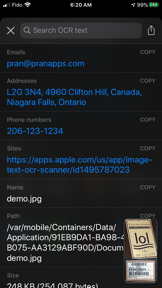


Image Text OCR Photo Scanner is a privacy-focused utility for iOS that extracts text and tabular data from images using on-device optical character recognition.
The App DNA
What makes this app unique?
The app removes the privacy and connectivity friction inherent in cloud-based OCR tools by processing all data locally on the user's device.
For Productivity-focused users and professionals who need to extract text and tabular data from images while maintaining data privacy.
What does it look like?
Key features
Optical character recognition performed locally without cloud transmission.
Automated workflow support returning JSON strings with extracted text and contact info.
Configurable separator settings to export image tables as CSV.
How much does it cost?
The app utilizes a usage-based gate to convert high-volume users via a single IAP, prioritizing an ad-free experience.
Velocity
Dormant developmentinternationalizationShow more...
The app has reached a zombie state, with no updates or feature releases in 2,069 days. The development history is limited to a single version from late 2020, which focused on internationalization and language support. There is no evidence of ongoing maintenance or active development for this application.
Who built it?
Pranoy Chowdhury
6 apps tracked · Utilities
 Note Flash Music Sight Reading
 Sudoku Extreme: Free no ads
 School Timetable - class study
 HACK for Hacker News YC Reader
 Keyboard Warrior Speed Typing
User Sentiment
What do users think recently?
How are ratings & reviews evolving?
Not enough recent reviews to extract reliable themes yet.
Read the full review analysisCompetition
Competitive landscape for Image Text OCR Photo Scanner
How's the Utilities market?
Image Text OCR Photo Scanner maintains a stable utility position with a 4.69 rating across 135 reviews, though the 5-year update gap limits its competitive standing against active rivals.
Read the market outlookThe rivals identified
Unlock the deeper market read.
Access the full report for freeThe Analyst's Read
Key takeaways for Image Text OCR Photo Scanner
Where is it heading?
The OCR utility market is consolidating around native platform features, leaving standalone apps like Image Text OCR Photo Scanner in a defensive posture. The app's future depends on maintaining stability for its core privacy-focused audience, as the lack of active development makes it increasingly difficult to compete with OS-level integrations.
- The 68-month development hiatus limits the app's ability to compete with native system-level OCR tools, accelerating long-term churn risk.
- The privacy-first, on-device architecture remains a stable differentiator for users who prioritize data security over frequent feature updates.
The SWOT
- On-device processing creates a privacy-first barrier against cloud-reliant rivals.
- Shortcuts integration enables automated JSON-based workflows for power users.
- Configurable tabular parsing allows direct CSV export from image tables.
- UI modernization could revitalize appeal to design-conscious productivity users.
- Expansion of supported languages would capture broader international segments.
Next best moves
Audit stability against current iOS versions because the app has not shipped an update since 2020 → prevent silent churn
The counter-intuitive read
The app's lack of updates is a feature…
Read the full takeSince the last report: The app's competitive outlook shifted from declining to stable, as the analysis now frames the lack of updates as a privacy-preserving feature rather than solely a maintenance failure. This pivot is accompanied by a more explicit recognition of native system-level OCR tools as a primary market threat.
Bottom line
Image Text OCR Photo Scanner offers a specialized, privacy-first utility that remains functional, but the five-year development hiatus leaves it vulnerable to platform-level obsolescence, necessitating a stability audit to defend the existing user base.
Unlock 2 critical frictions, 2 market threats and the analyst’s take.
Access the full report for freeFAQ
Is Image Text OCR Photo Scanner safe to use for sensitive documents?
How does Image Text OCR Photo Scanner compare to the built-in iOS OCR?
Is Image Text OCR Photo Scanner free to use?
Sources
- [1] App Store listing, source
Report last updated