


Image to PDF Converter!

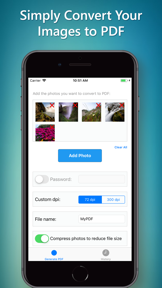

Image to PDF Converter is a utility for iOS that transforms photo library images into password-protected PDF documents.
The App DNA
What makes this app unique?
The tool removes the friction of manual image-to-PDF conversion, though its lack of file management visibility forces users to struggle when locating their saved documents.
For Users needing a simple, fast tool to convert mobile photo library images into PDF documents.
What does it look like?
Key features
Converts JPG and PNG files into PDF documents.
Allows users to set a password for generated PDF files, serving as a security-focused differentiator.
Enables users to select multiple photos to convert into a single PDF file.
How much does it cost?
The app is offered as a free utility with no visible in-app purchase or subscription gates.
Velocity
Dormant developmentopaqueShow more...
Development has ceased, with no updates or feature releases in over five years. The app remains in a zombie state, as the last recorded update was 1,875 days ago. There is no evidence of ongoing maintenance or operational support for the platform.
Who built it?
AliAkbar Ramezani
7 apps tracked · Utilities
 MP4 Converter!
 English to Spanish Dictionary!
 Text To Speech - Text Reader
 Wallpaper Creator!
 Crossword: ArrowWord Puzzle
 Bullber: Price Action Backtest
User Sentiment
What do users think recently?
The recent review mood reads frustrated.
How are ratings & reviews evolving?
What users say, by theme
- Users cannot locate essential document files within the interface, creating confusion regarding core functionality
1 of 1 recent reviews analyzed · limited sample
Read the full review analysisUnlock 1 user request, each backed by review evidence.
Access the full report for freeCompetition
Competitive landscape for Image to PDF Converter!
How's the Utilities market?
Image to PDF Converter maintains a static presence in the Utilities category with no feature updates since 2021. Its free, no-gate model serves as a basic entry-level utility, but the lack of development prevents it from competing with modern, cloud-integrated document scanners.
Read the market outlookThe rivals identified
Unlock the deeper market read.
Access the full report for freeThe Analyst's Read
Key takeaways for Image to PDF Converter!
Where is it heading?
The document utility market is consolidating around active, cloud-integrated platforms that offer seamless file management. Image to PDF Converter remains in a maintenance-only state, meaning it will continue to lose relevance as user expectations for file accessibility and cloud synchronization rise.
- The 60-month update gap signals a zombie product state, which prevents the app from addressing user complaints regarding file management visibility.
The SWOT
- Password protection for generated PDF files
- Adding a file management dashboard
Next best moves
Sunset the product because the 60-month update gap signals a lack of strategic intent → reduce brand drag
The counter-intuitive read
The lack of updates is not a failure…
Read the full takeSince the last report: The product's strategic status shifted from a candidate for navigation improvements to a sunsetting legacy utility. This change follows the confirmation of a 60-month development hiatus and the formal adoption of a sunsetting recommendation in the PM action plan.
Bottom line
Image to PDF Converter serves as a legacy utility that lacks the file management visibility required for modern document workflows, signaling that the product is effectively sunset.
Unlock 2 critical frictions, 1 market threat and the analyst’s take.
Access the full report for freeFAQ
Is Image to PDF Converter free to use?
Can I password protect my PDFs with this app?
Why can't I find my converted PDF files?
Sources
- [1] App Store
- [2] Developer website, source
Report last updated