


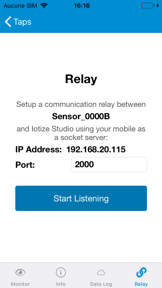
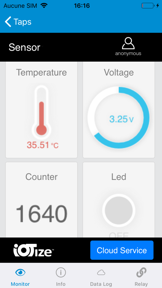
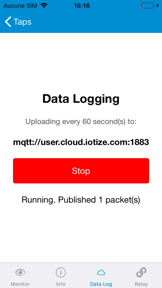

IoTize Tap Manager is a free utility for configuring and monitoring IoTize wireless modules on iOS and Android.
The App DNA
What makes this app unique?
The application removes the technical cost of custom mobile app development for industrial OEMs integrating wireless connectivity into their equipment.
For Embedded systems designers, industrial technicians, and OEMs retrofitting equipment for IoT connectivity.
What does it look like?
Key features
Visual interface for modifying settings on wireless modules, reducing technical barriers for OEMs.
Transmits device telemetry to IoTize Primer Cloud Services, creating recurring value for industrial clients.
Automated discovery of NFC and Bluetooth modules, lowering friction for field technicians.
How much does it cost?
The application functions as a free utility to support the sale of proprietary IoTize wireless hardware modules.
Velocity
Maintenance developmentUX improvementsperformanceShow more...
The app is currently in a maintenance phase, with only one release shipped in the last 180 days. Development momentum is low, as the latest release focused on library and form schema improvements rather than new user-facing content or features. With the last update occurring 180 days ago, the project shows no signs of an active or live-ops-driven release cycle.
Who built it?
User Sentiment
What do users think recently?
Recent user voice shows a thrilled sentiment. Users appreciate the application provides a highly satisfying user experience that meets expectations for core functionality.
How are ratings & reviews evolving?
What users say, by theme
- The application provides a highly satisfying user experience that meets expectations for core functionality
1 of 1 recent reviews analyzed · limited sample
Read the full review analysisCompetition
Competitive landscape for IoTize Tap Manager
How's the Utilities market?
IoTize Tap Manager serves as a niche utility within the industrial IoT sector, maintaining a stable presence as a free companion tool for proprietary hardware. The lack of recent functional updates reflects its role as a support layer rather than a standalone product.
Read the market outlookThe rivals identified
Unlock the deeper market read.
Access the full report for freeThe Analyst's Read
Key takeaways for IoTize Tap Manager
Where is it heading?
The industrial IoT market is consolidating around cloud-managed telemetry, placing pressure on hardware-specific utilities to provide deeper diagnostic value. IoTize Tap Manager remains a stable tool, but its current cadence leaves it exposed to rivals that offer more comprehensive industrial integration.
- The six-month release cadence confirms a maintenance-only posture, which ensures stability but limits the app's ability to capture new industrial use cases.
- Cloud data logging integration provides a clear path to recurring industrial value, distinguishing the utility from simple hardware-configuration tools.
The SWOT
- Visual configuration explorer reduces technical overhead for OEMs integrating IoTize hardware
- Cloud data logging telemetry creates a recurring value loop for industrial clients
- Expanding telemetry into predictive maintenance dashboards could unlock new industrial service revenue
- Localized configuration templates could accelerate deployment for high-volume industrial retrofit projects
Next best moves
Audit cloud telemetry usage because current data logging is a differentiator → increase industrial client retention
+ 1 more prioritized moveThe counter-intuitive read
The app's maintenance-mode cadence is a feature, not a bug…
Read the full takeFeature gaps
Offline diagnostic mode (missing here, standard in industrial fieldbus tools)
Bottom line
IoTize Tap Manager secures hardware sales by lowering integration costs for OEMs. Expanding diagnostic telemetry into predictive maintenance would unlock higher industrial value, moving the utility from a support tool to a core component of the client's operational workflow.
Unlock 2 critical frictions, 2 market threats, 1 more prioritized move and the analyst’s take.
Access the full report for freeFAQ
Is IoTize Tap Manager required to use IoTize wireless modules?
Does IoTize Tap Manager work offline?
What is the difference between IoTize Tap Manager and general industrial IoT apps?
Sources
Report last updated