


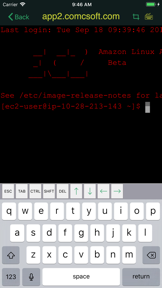


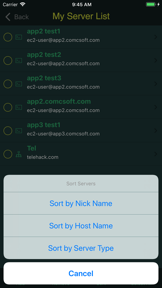
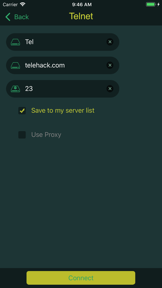
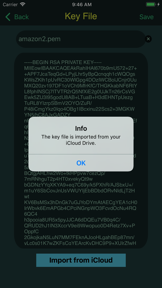


iTerminal is a mobile SSH and Telnet client for iOS and iPadOS designed for remote server management.
The App DNA
What makes this app unique?
Users hire iTerminal for quick, secure command-line access to remote servers, using iCloud to keep connection profiles synced across devices.
For System administrators, network engineers, and developers who require remote server access and terminal management on mobile devices.
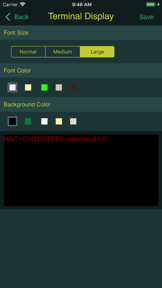
What does it look like?
Key features
Establishes remote server connections via standard SSH or Telnet protocols on iOS and iPadOS
Exports and imports server connection profiles via iCloud for cross-device configuration management
Supports encrypted PEM and PPK key files up to 4096 bits with iCloud Drive import functionality
How much does it cost?
The app operates as a free utility with no visible subscription or IAP gates.
Velocity
Active developmentShow more...
5 versions in history. Development pace: active.
Who built it?
ComcSoft
12 apps tracked · Utilities
 iZip Pro -Zip Unzip Unrar Tool
 iNetTools - Ping,DNS,Port Scan
 iTerminal Pro – SSH Telnet
 iEditor Pro – Text Code Editor
 Power PDF Pro
 iZip – Zip Unzip Unrar
 iEditor – Text Code Editor
 iTransfer - File Transfer Tool
 Power Photo – Photo Processing
 iTransfer Pro
 iNetTools - Pro
User Sentiment
What do users think recently?
How are ratings & reviews evolving?
Not enough recent reviews to extract reliable themes yet.
Read the full review analysisCompetition
Competitive landscape for iTerminal - SSH Telnet Client
How's the Utilities market?
iTerminal maintains a stable presence in the Utilities category with a 4.46 rating across 103 reviews. The lack of monetization or aggressive updates signals a maintenance-mode posture compared to high-velocity competitors.
Read the market outlookThe rivals identified

By Blink Shell, Inc
With over 200,000 ratings and a high-velocity release cadence, Blink Shell dominates the professional SSH and terminal market on iOS.
- Integrates a full Mosh client for persistent connections that survive network switches and sleep cycles.
- Provides a native terminal experience with support for Mosh, SSH, and advanced keyboard shortcuts for power users.
- Offers deep integration with iOS Files and local storage, enabling a true mobile development environment.


Unlock the head-to-head verdict: where this rival wins, and where it loses.
Access the full report for freeThe Analyst's Read
Key takeaways for iTerminal - SSH Telnet Client
Where is it heading?
The mobile terminal market is consolidating around professional-grade tools that offer persistent sessions and file-system integration. iTerminal's maintenance-mode posture leaves it exposed to these feature-rich rivals, so the PM must decide whether to pivot to a paid model or accept a slow decline in user engagement.
- Recent updates focused on stability and iOS compatibility, indicating the app remains in a maintenance-mode lifecycle.
- The lack of persistent Mosh support forces power users toward professional alternatives, which will erode the user base over time.
The SWOT
- iCloud sync creates high switching costs for multi-device users
- Bluetooth keyboard support enables professional-grade command entry
- Integrating native Mosh support would bridge the gap to professional terminal clients
- Adding a paid tier for advanced automation could fund development
Next best moves
Ship Mosh protocol support because it is the primary differentiator for professional terminal users → increase retention among power users
+ 1 more prioritized moveThe counter-intuitive read
The lack of monetization is not a weakness but a moat…
Read the full takeFeature gaps
Persistent Mosh connections (available in Blink Shell) +2
Since the last report: The report now frames iTerminal as a maintenance-mode tool facing significant competitive pressure from professional-grade alternatives due to missing protocol support and lack of monetization.
Bottom line
iTerminal provides a reliable, simple SSH connection for casual users, but its lack of persistent session management and monetization leaves it vulnerable to professional-grade rivals, so the PM should prioritize Mosh support to defend the user base against churn.
Unlock 2 critical frictions, 2 market threats, 1 more prioritized move and the analyst’s take.
Access the full report for freeReport last updated