


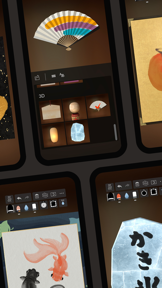


Zen Brush 3 is a digital art application designed to simulate the authentic experience of East Asian ink painting and calligraphy. It utilizes a 3D brush model to provide realistic, fluid strokes with customizable water and color settings. The app is notable for its focus on minimalist, intuitive design that allows users to begin creating art immediately upon launch.
Overview · Full Intel report in progress
The App DNA
What makes this app unique?
For Artists, calligraphers, and hobbyists interested in digital East Asian ink painting and Zen-style art.
What does it look like?
Key features
Simulates the physical behavior of an East Asian ink brush for natural and varied stroke handling.
Allows users to adjust water levels and ink colors to achieve a wider range of artistic expression.
Provides a variety of atmospheric paper and background styles to enhance the aesthetic of the artwork.
Enables users to share and edit their calligraphy and images directly with other applications.
How much does it cost?
Velocity
Steady developmentShow more...
5 versions in history. Development pace: steady.
Who built it?
PSOFT
6 apps tracked · Graphics & Design
 AR Missile - Auto Tracking
 あずきザザー
 PSOFT Audio Player
 Crayon Style
 Zen Brush 2
User Sentiment
What do users think recently?
How are ratings & reviews evolving?
Not enough recent reviews to extract reliable themes yet.
Read the full review analysisCompetition
Competitive landscape for Zen Brush 3
How's the Graphics & Design market?
The rivals identified
The Analyst's Read
Key takeaways for Zen Brush 3
Where is it heading?
Bottom line
While the app offers a highly realistic brush engine, user feedback suggests that default canvas resolution settings and UI navigation for clearing the canvas are key areas for potential optimization.
Report last updated