


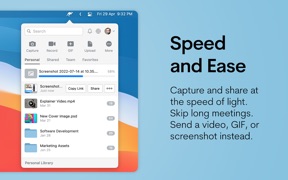


Jumpshare is a productivity platform for screen recording, screenshot annotation, and file sharing on macOS.
The App DNA
What makes this app unique?
Users hire Jumpshare to replace multiple utility apps with a single, fast workflow for visual feedback and project asset management.
For Growth marketers, founders, and creative professionals who need to share visual feedback and project assets with clients quickly.
What does it look like?
Key features
Captures screen activity with click tracking, audio voiceover, and webcam integration
Renders over 200 file formats directly in the browser without requiring native software
Allows users to apply custom logos and host files on personal domains
How much does it cost?
Freemium model anchors at $9.99/month, gating advanced security, storage, and white-labeling features to convert professional users.
Velocity
Steady developmentShow more...
Who built it?
Jumpshare
2 apps tracked · Productivity
 Jumpshare: Secure File Sharing
User Sentiment
What do users think recently?
Fresh user feedback skews excited. Users appreciate drag and drop file sharing functionality provides a fast and simple workflow for daily tasks and integrated screenshot annotation and screen recording tools replace the need for multiple separate utility applications, but report mandatory webcam access permissions following the latest update prevent the application from functioning for file transfers.
How are ratings & reviews evolving?
What users say, by theme
- Drag and drop file sharing functionality provides a fast and simple workflow for daily tasks
- Integrated screenshot annotation and screen recording tools replace the need for multiple separate utility applications
- Mandatory webcam access permissions following the latest update prevent the application from functioning for file transfers
60 of 81 recent reviews analyzed · high confidence · Excited overall
Read the full review analysisUnlock 1 more frustration theme and 1 user request, each backed by review evidence.
Access the full report for freeCompetition
Competitive landscape for Jumpshare - Screen Recorder
How's the Productivity market?
Users report: Jumpshare competes in the productivity space by bundling capture and sharing tools, but the lack of public rating data suggests low visibility compared to established rivals.
Read the market outlookThe rivals identified
Unlock the deeper market read.
Access the full report for freeThe Analyst's Read
Key takeaways for Jumpshare - Screen Recorder
Where is it heading?
Users report: The productivity capture market is shifting toward local-first AI processing, which exposes Jumpshare's cloud-dependent model to privacy-conscious enterprise users. Unless the team addresses the current friction in the recording workflow, they risk losing market share to leaner, AI-native competitors.
- Mandatory webcam permissions in the latest update disrupt the core file-transfer workflow, leading to immediate user frustration and potential churn.
- Recent performance optimizations for macOS Tahoe demonstrate active maintenance, ensuring the app remains compatible with the latest system requirements.
The SWOT
- Integrated multi-tool workflow replaces disparate software
- 200+ format preview engine reduces stakeholder friction
- Education partnerships for B2B distribution
- Wearable integration for remote professional dictation
Next best moves
Remove mandatory webcam permissions because user complaints flag it as a blocker for file transfers → restore core utility usage
+ 1 more prioritized moveThe counter-intuitive read
The 30-second recording limit is not just a monetization gate…
Read the full takeFeature gaps
Real-time AI summarization (available in Nono AI but absent here) +1
Since the last report: Jumpshare's competitive position is currently strained by technical regressions in the latest update and a restrictive free-tier model that limits growth.
Bottom line
Jumpshare succeeds by consolidating visual communication tools, but the latest update's intrusive permission requirements and restrictive free-tier limits threaten its user base, so the PM should prioritize restoring core utility to prevent churn.
Unlock 3 critical frictions, 2 market threats, 1 more prioritized move and the analyst’s take.
Access the full report for freeReport last updated