


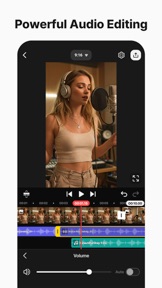

KineMaster is a professional-grade video editing app for mobile content creators, featuring a timeline-based interface and AI-powered tools on iOS and Android.
The App DNA
What makes this app unique?
Creators use KineMaster to perform complex, multi-track edits on mobile devices, avoiding the performance limitations of desktop software while maintaining professional production values.
For Mobile content creators producing short-form video for YouTube, TikTok, and Instagram who require professional-grade editing tools on portable devices.
What does it look like?
Key features
Automated background removal for faces and people, serving as a premium-tier gate to reduce manual rotoscoping time.
Cloud-based backup for project continuity, increasing switching costs by locking history into a proprietary format.
Professional-grade green screen compositing that establishes authority in the mobile NLE space.
How much does it cost?
The freemium model utilizes feature-gating for high-fidelity 4K export and AI tools to incentivize conversion to recurring subscriptions.
Velocity
Steady developmentUX improvementsnew contentShow more...
KineMaster maintains a steady development pace, shipping 10 distinct versions over the observed window with an average cadence of roughly 0.3 releases per week. Development is currently focused on UX improvements, specifically streamlining text editing and animation workflows directly within the preview screen. The release trend is stable, with consistent feature parity maintained across iOS and Android platforms. The publisher provides clear, descriptive release notes detailing these functional enhancements.
Who built it?
KineMaster
4 apps tracked · Photo & Video
 Spring - Video Editor
 BeatSync - Video Maker
 AniToon: Draw Art & Animate
User Sentiment
What do users think recently?
The recent review mood reads excited. Users appreciate the intuitive editing interface allows creators to produce high-quality video content without needing professional training and the extensive library of templates and effects provides professional-grade production value for mobile-first social media creators, but report the prominent watermark on exported videos frustrates creators who want a clean look without paying for a subscription.
How are ratings & reviews evolving?
Weekly average review rating
What users say, by theme
- The intuitive editing interface allows creators to produce high-quality video content without needing professional training
- The extensive library of templates and effects provides professional-grade production value for mobile-first social media creators
- The free tier offers sufficient functionality for casual users to edit and export content without immediate subscription pressure
- The prominent watermark on exported videos frustrates creators who want a clean look without paying for a subscription
120 of 4373 recent reviews analyzed · high confidence · Excited overall
Read the full review analysisUnlock 2 more frustration themes and 2 user requests, each backed by review evidence.
Access the full report for freeCompetition
Competitive landscape for KineMaster - Video Editor
How's the Photo & Video market?
KineMaster holds a strong position in the Photo & Video category, ranking #12 Grossing in the US. The gap between its free-tier accessibility and premium-gated 4K export functionality drives the conversion funnel for prosumer creators.
Read the market outlookThe rivals identified
Unlock the deeper market read.
Access the full report for freeThe Analyst's Read
Key takeaways for KineMaster - Video Editor
Where is it heading?
The mobile editing market is consolidating around high-velocity, AI-first workflows. KineMaster's stable release cadence provides a foundation, but the app must address technical regressions to avoid losing prosumer users to more stable, cross-platform rivals.
- Post-update stability regressions disrupt the editing workflow, which compounds the rating drag already visible on Android.
- The latest release ships an active community-gallery integration, signaling continued investment in the creator ecosystem.
The SWOT
- Professional-grade timeline controls establish authority in the mobile NLE space
- KineCloud project sync increases switching costs by locking history into a proprietary format
- Localized pricing could capture the casual-to-prosumer transition segment
Next best moves
Audit post-update stability regressions because playback failures disrupt the editing workflow → improve retention
+ 1 more prioritized moveThe counter-intuitive read
The reliance on a traditional timeline interface is KineMaster's greatest asset…
Read the full takeFeature gaps
Native desktop application (available in Filmora but missing here) +1
Since the last report: Technical stability has become the primary friction point, with post-update regressions now actively disrupting the editing workflow and suppressing sentiment. The product remains anchored by its professional-grade timeline, but user demand is increasingly focused on cross-platform availability to bypass mobile performance limitations.
Bottom line
KineMaster's professional-grade timeline remains its strongest differentiator, but technical instability and the restrictive watermark are eroding the user base. Stabilizing the core editing experience will unlock higher long-term retention among prosumer creators.
Unlock 2 critical frictions, 1 market threat, 1 more prioritized move and the analyst’s take.
Access the full report for freeFAQ
Is KineMaster suitable for professional video editing?
How does KineMaster compare to CapCut?
Can I use KineMaster for free?
What are the best alternatives to KineMaster?
Sources
- [1] Play Store listing, source
Report last updated