




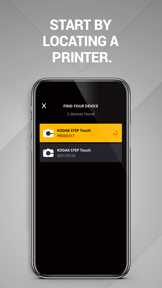

KODAK STEP Prints is a utility-driven mobile companion for KODAK STEP Touch cameras that enables photo editing and physical printing on iOS and Android.
The App DNA
What makes this app unique?
The app removes the cognitive friction of complex editing menus for users who only want to prepare photos for physical output.
For Owners of KODAK STEP Touch cameras and mobile users seeking to print digital photos from their smartphones.
What does it look like?
Key features
Direct hardware pairing for printing photos captured on KODAK STEP Touch devices.
Visual confirmation of print layout and composition before physical output.
How much does it cost?
The app functions as a utility-driven hardware companion with no direct digital monetization, focusing on driving physical product sales.
Velocity
Maintenance developmentperformanceUX improvementsShow more...
The app currently operates on a maintenance cadence, averaging approximately 0.09 releases per week over the last four months. Development is strictly limited to minor bug fixes and stability improvements, such as addressing Facebook connectivity and firmware update processes. There is no evidence of new feature development or live operations, indicating a focus on long-term stability rather than active growth.
Who built it?
C&A Marketing
5 apps tracked · Entertainment
 Truvitals
 HP Sprocket
 Lifeprint Printers
 Mint Printer
User Sentiment
What do users think recently?
Recent user voice shows an excited sentiment. Users appreciate simplified, task-oriented ux that avoids the feature bloat found in complex editors, but report missing granular color correction and skin-smoothing tools.
How are ratings & reviews evolving?
What users say, by theme
- Simplified, task-oriented UX that avoids the feature bloat found in complex editors
- Missing granular color correction and skin-smoothing tools
Competition
Competitive landscape for KODAK STEP Prints
How's the Entertainment market?
KODAK STEP Prints maintains a 4.68-star rating across 9,084 total ratings, positioning it as a highly-rated niche utility. The lack of direct digital monetization signals that its primary value is the retention of hardware users rather than app-store revenue generation.
Read the market outlookThe rivals identified

By PicsArt, Inc.
Picsart competes directly by offering a comprehensive suite of AI-driven editing tools that capture the same creative-focused mobile photography audience as KODAK STEP.
- Offers advanced AI Playground and background removal tools that far exceed KODAK's basic editing capabilities.
- Maintains a massive social ecosystem and community-driven content library that creates significant user lock-in.
- Provides professional-grade video editing features that KODAK STEP currently lacks in its mobile application.
 Tangled FXContender
 Halloween Photo Editor 2020Contender
 Photo Collage Maker & CreatorContender
 Photo frames collection appContender
Unlock the head-to-head verdict: where this rival wins, and where it loses.
Access the full report for freeThe Analyst's Read
Key takeaways for KODAK STEP Prints
Where is it heading?
The market for hardware-companion apps is consolidating around simple, reliable utilities that minimize time-to-print. KODAK STEP Prints is well-positioned to maintain its niche, provided it addresses the basic image-correction gaps that drive user frustration.
- The 4.68-star rating indicates the core printing utility meets the needs of the hardware-owning user base.
- The 6-week maintenance-only update cadence leaves the app vulnerable to creative-suite rivals that ship frequent AI-driven feature updates.
The SWOT
- Direct hardware pairing for KODAK STEP Touch devices creates a proprietary printing workflow
- Localized print-template expansion for regional holidays could increase engagement in international markets
Next best moves
Ship basic color-correction sliders because user requests for adjustments are the top complaint theme → increase print satisfaction
The counter-intuitive read
The app's maintenance-mode status is a feature, not a bug…
Read the full takeFeature gaps
Granular color correction (available in Picsart but missing here) +1
Since the last report: The product roadmap pivoted from technical firmware maintenance to addressing user-requested image editing tools, while the competitive narrative shifted to frame the app's simplicity as a deliberate differentiator against AI-heavy rivals.
Bottom line
KODAK STEP Prints succeeds as a hardware-centric utility, but the lack of basic image adjustment tools creates a ceiling for user satisfaction. Adding essential color-correction sliders would address the primary complaint theme and increase the value of physical prints.
Unlock 1 critical friction, 1 market threat and the analyst’s take.
Access the full report for freeFAQ
Is KODAK STEP Prints compatible with other photo printers?
How does KODAK STEP Prints compare to Picsart?
Does KODAK STEP Prints include ads or in-app purchases?
What are the best alternatives for photo editing?
Sources
- [1] App Store, source
Report last updated