


Learn Binary: Bits & Hex
By Tapricot

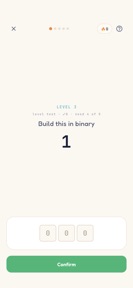
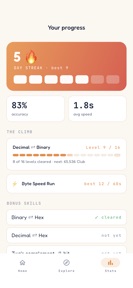

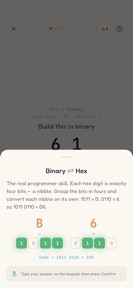

Learn Binary: Bits & Hex is an educational app for computer science students that turns number-base conversion into interactive drills on iOS and Android.
The App DNA
What makes this app unique?
The app removes the cognitive friction of manual binary conversion by providing a visual, nibble-based mental model that standard calculators lack.
For Computer science students, bootcamp learners, and developers seeking to improve mental math proficiency in binary, hex, and bitwise operations.
What does it look like?
Key features
Displays hex values over color-coded 4-bit nibbles to illustrate base conversion mechanics.
Progressive difficulty structure that unlocks new bit-width challenges upon clearing 80% mastery tests.
Full functionality available without account creation or internet connectivity.
How much does it cost?
Freemium model utilizing a single one-time purchase to gate ad-free usage, avoiding recurring subscription overhead.
Velocity
Maintenance developmentUX improvementsinternationalizationplatform expansionShow more...
Learn Binary: Bits & Hex currently operates at a maintenance cadence, with two releases identified over the last three months. The latest version demonstrates a focus on user-requested drill customization and internationalization, alongside layout improvements for tablets. Development appears stable but infrequent, with no evidence of a high-frequency update cycle or live-ops strategy. The current release pattern suggests a focus on targeted feature additions rather than rapid iteration.
Who built it?

User Sentiment
What do users think recently?
Fresh user feedback skews excited. Users appreciate binary drilling practice provides a helpful learning tool for students starting their computer science journey.
How are ratings & reviews evolving?
What users say, by theme
- Binary drilling practice provides a helpful learning tool for students starting their computer science journey
- Lack of a built-in calculator forces users to perform mental math during binary drilling sessions
2 of 2 recent reviews analyzed · limited sample
Read the full review analysisUnlock 1 user request, each backed by review evidence.
Access the full report for freeCompetition
Competitive landscape for Learn Binary: Bits & Hex
How's the Education market?
Learn Binary: Bits & Hex occupies the education category as a specialized drill tool, distinguishing itself from general-purpose calculators through its nibble-block visualization.
Read the market outlookThe rivals identified
Unlock the deeper market read.
Access the full report for freeThe Analyst's Read
Key takeaways for Learn Binary: Bits & Hex
Where is it heading?
The app is transitioning from a basic drill tool to a more customizable learning environment following the recent addition of bit-width controls. If the developer adds a calculator interface, Learn Binary: Bits & Hex will likely improve its retention among students who currently find the manual input too cumbersome for daily use.
- The latest release successfully addressed the high-frequency request for custom bit-width drilling, signaling active responsiveness to user feedback.
- Persistent user complaints regarding the lack of a calculator suggest the current manual-input design limits the app's utility for power users.
The SWOT
- Nibble-block visualization creates a pedagogical barrier against standard calculator rivals.
- Offline-first architecture removes account-creation friction for privacy-conscious learners.
- Calculator integration would resolve the top-cited user frustration.
- Expanding drill-length customization targets the primary request from student users.
Next best moves
Ship a built-in calculator interface because user complaints cite manual mental math as the primary friction point → reduce churn.
The counter-intuitive read
The app's lack of a calculator is a feature, not a bug…
Read the full takeBottom line
Learn Binary: Bits & Hex secures its niche through a pedagogical nibble-block visualization that standard calculators lack. Integrating a calculator interface would resolve the primary user frustration, reducing churn among learners who find manual input cumbersome.
Unlock 2 critical frictions, 2 market threats and the analyst’s take.
Access the full report for freeFAQ
Is Learn Binary: Bits & Hex suitable for beginners?
How does Learn Binary: Bits & Hex compare to a standard calculator?
Does Learn Binary: Bits & Hex require an internet connection?
What are some alternatives to Learn Binary: Bits & Hex?
Sources
- [1] Developer website, source
Report last updated