


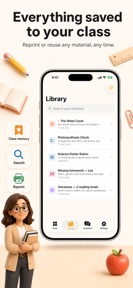

LessonSpark is an AI-powered productivity tool for K-12 teachers that converts physical classroom materials into digital lesson plans and assessments on iOS.
The App DNA
What makes this app unique?
Teachers hire LessonSpark to reclaim time from repetitive administrative tasks like worksheet creation and parent communication, using the camera as a primary input mechanism to bridge the gap between analog and digital workflows.
For K-12 teachers looking to automate lesson planning, grading, and parent communication tasks.
What does it look like?
Key features
Uses OCR to convert textbook pages, student papers, or whiteboard notes into worksheets, feedback, or slide outlines.
Stores class, subject, and student data locally to pre-fill templates and tools.
Natural language interface that suggests and configures tools based on user-described teaching scenarios.
How much does it cost?
Freemium model uses subscription gates to unlock advanced teacher tools and content adaptation features.
Velocity
Maintenance developmentopaqueShow more...
The app is in its infancy with only a single release recorded to date. As the platform has only been available for less than a week, it is currently categorized as maintenance until a consistent update cadence is established. Future updates will clarify whether the developer intends to maintain an active feature-release cycle or a more periodic maintenance schedule.
Who built it?
ASIYE GUNEY
8 apps tracked · Education
 Med GPT: AI Doctor Assistant
 AI Trading Assistant Chart Pro
 Game Maps IRL: SpawnMap GPS
 SnapStage: AI Virtual Staging
 Education AI: WorkSheets Maker
 Создатель раскрасок Colorfully
 AI video clipping: Clipx
User Sentiment
What do users think recently?
How are ratings & reviews evolving?
Not enough recent reviews to extract reliable themes yet.
Read the full review analysisCompetition
Competitive landscape for LessonSpark: AI Teacher Tools
How's the Education market?
LessonSpark is a new entrant in the Education category, having launched its initial version 5 days ago. Its positioning relies on privacy-first local processing, which differentiates it from cloud-heavy AI competitors.
Read the market outlookThe rivals identified
Unlock the deeper market read.
Access the full report for freeThe Analyst's Read
Key takeaways for LessonSpark: AI Teacher Tools
Where is it heading?
The education technology market is shifting toward integrated AI workflows that exist within existing LMS platforms. LessonSpark's standalone nature leaves it exposed to platform-level competition, so the team must prioritize integration to remain relevant.
- The app is in its initial release phase, focusing on establishing a core user base before scaling features.
The SWOT
- Local-only data storage functions as a privacy barrier, simplifying compliance for school-district adoption.
- Camera-to-content processing replaces manual transcription, saving time on daily worksheet generation.
- Class-aware templates reduce repetitive setup, increasing the utility of the app for recurring daily tasks.
- Integration with school-wide LMS platforms could automate the distribution of AI-generated content.
- Expansion into direct student-facing homework help could increase the user base beyond the teacher segment.
Next best moves
Ship cloud-syncing for materials because local-only storage limits cross-device utility for teachers → increase daily active usage
The counter-intuitive read
The privacy-focused local storage is not just a feature…
Read the full takeSince the last report: The analysis shifted from focusing on AI accuracy and freemium conversion to addressing infrastructure limitations like cloud-syncing and the threat of LMS-integrated competition.
Bottom line
LessonSpark provides immediate value through on-device OCR and template automation, but its reliance on manual camera input restricts its use to physical planning sessions, so the team should prioritize LMS-export features to integrate into the teacher's existing workflow.
Unlock 2 critical frictions, 1 market threat and the analyst’s take.
Access the full report for freeSources
- [1] App Store, source
Report last updated