


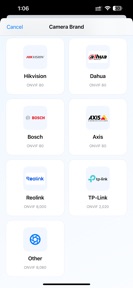
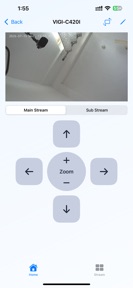

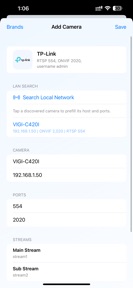

Local Cam is a local IP camera viewer for RTSP and ONVIF-compatible hardware, designed for direct network monitoring on iOS.
The App DNA
What makes this app unique?
Users hire Local Cam to maintain total control over their camera feeds without relying on third-party cloud services or recurring subscription fees.
For Users managing local IP camera networks who require direct, cloud-independent monitoring solutions.
What does it look like?
Key features
Direct connection to local IP cameras via standard protocols.
Customizable grid layout for monitoring multiple live feeds simultaneously.
Pan, tilt, and zoom functionality for compatible ONVIF hardware.
Batch import and setup of multiple camera devices.
How much does it cost?
The app is currently free with no visible in-app purchase or subscription gates, providing a low-friction entry point.
Velocity
Maintenance developmentnew contentUX improvementsShow more...
The app currently ships at a maintenance-level cadence, with the latest release occurring 21 days ago. Development is focused on technical infrastructure and utility improvements rather than frequent feature iteration. The release history shows a single update in the analyzed window, indicating a stable but slow development pace. Future updates are expected to continue at this infrequent interval.
Who built it?
User Sentiment
What do users think recently?
How are ratings & reviews evolving?
Not enough recent reviews to extract reliable themes yet.
Read the full review analysisCompetition
Competitive landscape for Local Cam: IP Camera Viewer
How's the Productivity market?
Local Cam occupies a niche segment of the productivity category, focusing on local-only camera access. The absence of a subscription model provides a clear differentiator against cloud-heavy security apps.
Read the market outlookThe rivals identified
Unlock the deeper market read.
Access the full report for freeThe Analyst's Read
Key takeaways for Local Cam: IP Camera Viewer
Where is it heading?
The market for local camera viewers is consolidating around apps that balance privacy with ease of use. Local Cam is currently stable but exposed to competitors that offer automated discovery, so the PM must prioritize onboarding to defend the user base.
- The latest release added bulk onboarding, indicating the developer is still actively maintaining the app despite a slow update cadence.
- The reliance on manual RTSP configuration creates a high barrier to entry, which will likely limit user growth compared to automated cloud-based alternatives.
The SWOT
- Direct local-access architecture eliminates cloud-subscription costs
- Multi-camera grid view supports efficient monitoring of large local setups
- Automated device discovery could lower onboarding friction
- AI-based motion detection could differentiate the viewer
Next best moves
Ship automated device discovery because manual RTSP entry is the primary friction point for new users → increase install-to-active conversion
+ 1 more prioritized moveThe counter-intuitive read
The app's lack of cloud features is its primary strength…
Read the full takeSince the last report: The developer is shifting from a purely maintenance-focused stance to evaluating monetization strategies and onboarding improvements to address competitive pressure.
Bottom line
Local Cam provides a solid, privacy-focused utility for local IP camera management, but the manual configuration requirement limits its growth, so the PM should prioritize automated device discovery to lower the barrier for non-technical users.
Unlock 2 critical frictions, 2 market threats, 1 more prioritized move and the analyst’s take.
Access the full report for freeSources
- [1] App Store, source
Report last updated