


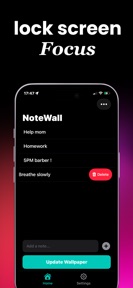

Lock Screen Notes: NoteWall is a productivity tool for iPhone that generates custom lock screen wallpapers containing user-defined text and reminders.
The App DNA
What makes this app unique?
The app removes the cognitive friction of opening a task manager by placing priorities directly on the lock screen, serving users who struggle with focus or habit maintenance.
For iPhone users, including students and professionals, who require persistent visual cues to manage tasks, habits, and ADHD-related focus challenges.
What does it look like?
Key features
Automated creation of custom lock screen wallpapers containing user-defined text, goals, or reminders.
Uses Apple Shortcuts as a bridge to update lock screen wallpaper content without manual app navigation.
All note data resides on-device with no cloud synchronization or account requirement.
How much does it cost?
Subscription-only model with no free trial, anchored by unlimited wallpaper exports and future updates.
Velocity
Maintenance developmentUX improvementsmonetizationShow more...
Lock Screen Notes: NoteWall has shipped two releases over the observed window, resulting in a maintenance-level cadence of approximately one release every 45 days. The latest release indicates a focus on UX improvements and monetization clarity, though the previous update lacked descriptive release notes. Development appears stable but infrequent, with no evidence of a high-velocity feature pipeline or live-ops strategy. The current trend is consistent with a maintenance-focused update cycle.
Who built it?
Karol Billik
4 apps tracked · Productivity
 Quran Widget: QuranWall
 Vision Board Maker: DreamWall
 Lock Screen Bible Verse
User Sentiment
What do users think recently?
Fresh user feedback skews frustrated. Users appreciate the visual design and user interface layout provide a clean experience for managing daily reminders and lock screen integration allows users to view important notes without needing to unlock their device.
How are ratings & reviews evolving?
What users say, by theme
- The visual design and user interface layout provide a clean experience for managing daily reminders
- Lock screen integration allows users to view important notes without needing to unlock their device
- The subscription pricing model feels excessive for a utility that performs a simple note-taking function
8 of 8 recent reviews analyzed · limited sample · Frustrated overall
Read the full review analysisUnlock 2 more frustration themes, each backed by review evidence.
Access the full report for freeCompetition
Competitive landscape for Lock Screen Notes: NoteWall
How's the Productivity market?
Lock Screen Notes: NoteWall holds a 4.5-star rating across 106 reviews, positioning itself as a niche productivity utility. The lack of a free trial tier creates a monetization gap compared to standard productivity apps, which typically offer freemium entry to build user trust.
Read the market outlookThe rivals identified
Unlock the deeper market read.
Access the full report for freeThe Analyst's Read
Key takeaways for Lock Screen Notes: NoteWall
Where is it heading?
The lock screen utility market is becoming increasingly crowded with native iOS features, leaving specialized apps like Lock Screen Notes: NoteWall vulnerable. The current maintenance-level update cadence suggests limited feature expansion, which will likely lead to further churn as users migrate to free, native alternatives.
- The subscription-only model without a free trial creates a high churn rate, which limits the app's ability to scale its user base.
- Recent onboarding improvements suggest a shift toward reducing friction, though the core pricing strategy remains a significant barrier to long-term growth.
The SWOT
- Automated wallpaper generation replaces manual widget management
- Apple Shortcuts integration enables hands-free content updates
- Introduce limited free tier to lower acquisition friction
- Add widget-based previewing to reduce setup time
Next best moves
Introduce a 3-day free trial because users flag the subscription-only model as a primary frustration → reduce immediate churn
+ 1 more prioritized moveThe counter-intuitive read
The app's reliance on lock screen wallpapers is…
Read the full takeSince the last report: The app's competitive outlook has darkened due to the encroachment of native iOS features, prompting a shift in strategic focus from internal onboarding friction to external market viability. The core product and pricing model remain unchanged, but the SWOT analysis now reflects a more urgent need to differentiate from native system capabilities.
Bottom line
The subscription-only model creates a barrier that outweighs the utility for most users. Pivoting to a freemium model would lower the acquisition friction and allow the app to demonstrate value before the paywall, which would stabilize the current rating drag.
Unlock 2 critical frictions, 2 market threats, 1 more prioritized move and the analyst’s take.
Access the full report for freeFAQ
Is Lock Screen Notes: NoteWall free to use?
How does this app compare to native iOS widgets?
Is this app suitable for ADHD focus management?
Sources
Report last updated