


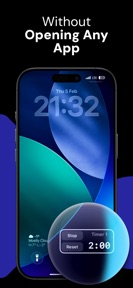

Lock Screen Timer & Stopwatch is a minimalist utility for iOS that provides quick-access timing via Lock Screen widgets and Live Activity integration.
The App DNA
What makes this app unique?
The app removes the friction of unlocking a device to manage time-boxed tasks, serving users who require immediate, distraction-free control during workouts or intervals.
For iOS users requiring distraction-free, quick-access timing for workouts, intervals, or time-boxed tasks.
What does it look like?
Key features
Native iOS widgets allow timer control directly from the Lock Screen.
Displays active timers or stopwatch in the Dynamic Island and on the Lock Screen.
Audible alert system that overrides silent mode and Focus settings.
How much does it cost?
The app is currently offered as a free utility with no visible monetization gates or subscription tiers.
Velocity
Maintenance developmentnew contentUX improvementsShow more...
The app maintains a maintenance cadence, with only one release shipped in the last 25 days and no other activity in the observed window. Development is focused on enhancing core utility through new features like Live Activity, Dynamic Island integration, and improved alarm reliability. The current release frequency suggests a focus on stability and incremental feature additions rather than rapid iteration. Future updates are expected to follow this infrequent, feature-driven pattern.
Who built it?
User Sentiment
What do users think recently?
How are ratings & reviews evolving?
Not enough recent reviews to extract reliable themes yet.
Read the full review analysisCompetition
Competitive landscape for Lock Screen Timer & Stopwatch
How's the Utilities market?
Lock Screen Timer & Stopwatch operates as a niche utility within the iOS ecosystem. Its reliance on native system features like Dynamic Island integration provides a competitive edge in speed, though the absence of a monetization model limits its ability to scale against broader, ad-supported clock utilities.
Read the market outlookThe rivals identified
Unlock the deeper market read.
Access the full report for freeThe Analyst's Read
Key takeaways for Lock Screen Timer & Stopwatch
Where is it heading?
The utility market on iOS is increasingly consolidating around native system features, which creates a high risk of redundancy for specialized timer apps. Lock Screen Timer & Stopwatch must transition from a free utility to a sustainable product model to survive potential platform-level feature expansions.
- The maintenance-only release cadence suggests the developer is treating the app as a finished utility rather than a growth-focused product.
- Lack of monetization gates limits the capital available for feature expansion, making the app vulnerable to native iOS feature updates.
The SWOT
- Native iOS widget integration reduces session friction for interval-based workflows
- Live Activity support maintains app visibility within the system UI
- Localized pricing could capture high-ARPU markets where standard system utilities lack customization
Next best moves
Audit alarm reliability across iOS versions because silent-mode overrides are a top churn risk in utility categories → maintain utility trust
+ 1 more prioritized moveThe counter-intuitive read
The app's minimalist, maintenance-mode design is its primary asset…
Read the full takeBottom line
Lock Screen Timer & Stopwatch relies on system-level integration to provide value, but its maintenance-only cadence leaves it vulnerable to platform-level feature updates. Establishing a clear monetization path via premium alarm customization would provide the capital needed to move beyond a single-utility toolset.
Unlock 1 critical friction, 1 market threat, 1 more prioritized move and the analyst’s take.
Access the full report for freeFAQ
Is Lock Screen Timer & Stopwatch free to use?
Does Lock Screen Timer & Stopwatch work on the Lock Screen?
Can I use this app for interval workouts?
What makes this different from the built-in iOS Clock app?
Sources
- [1] App Store, source
Report last updated