


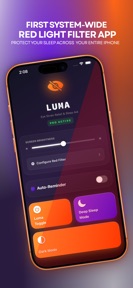


Luma Sleep is an iOS utility that applies system-wide red light filters and screen dimming via iOS Shortcuts.
The App DNA
What makes this app unique?
It serves users who find the standard iOS brightness threshold insufficient for nighttime reading, removing the need for jailbreaking to achieve deeper dimming.
For Users seeking to reduce eye strain from device usage in dark environments, specifically those utilizing iOS accessibility features.
What does it look like?
Key features
Applies a red screen tint to reduce blue light exposure during nighttime use
Dims screen brightness below the standard iOS minimum threshold
Automates filter application across system-wide interfaces including Lock Screen and social apps via iOS Shortcuts
How much does it cost?
Freemium model relies on a free utility base with gated Pro features to drive conversion.
Velocity
Maintenance developmentUX improvementsperformanceShow more...
Luma Sleep – Night Screen is currently in a maintenance phase, having shipped only one release in the last 157 days. Development activity is limited to minor technical adjustments, specifically addressing UI scaling and performance stability. There is no evidence of active feature development or live operations. The current cadence suggests a focus on basic upkeep rather than ongoing product evolution.
Who built it?

User Sentiment
What do users think recently?
Fresh user feedback skews frustrated. Users appreciate red light filter functionality provides a clear benefit for users migrating from other mobile platforms.
How are ratings & reviews evolving?
What users say, by theme
- Red light filter functionality provides a clear benefit for users migrating from other mobile platforms
- Persistent requests for app store reviews interrupt the user experience without an option to disable prompts
5 of 5 recent reviews analyzed · limited sample
Read the full review analysisUnlock 2 more frustration themes, each backed by review evidence.
Access the full report for freeCompetition
Competitive landscape for Luma Sleep – Night Screen
How's the Utilities market?
Luma Sleep occupies a niche utility space on iOS, currently holding a 4.03 rating across 28 total ratings. The lack of updates for 157 days suggests a maintenance-only posture that limits its ability to compete with native iOS accessibility improvements.
The rivals identified
The Analyst's Read
Key takeaways for Luma Sleep – Night Screen
Where is it heading?
The utility market for screen filters is consolidating around native iOS accessibility features, which are free and privacy-compliant. Luma Sleep's maintenance-mode status and reliance on intrusive UX patterns leave it exposed to further erosion as iOS continues to integrate these features natively.
- The 157-day update gap suggests the developer has moved to maintenance mode, leaving the app vulnerable to OS-level changes.
- Persistent review prompts and grayscale persistence after uninstallation drive negative sentiment, which compounds the risk of user churn.
The SWOT
- Native iOS accessibility integration avoids risky system modifications.
- Red light filter provides a clear benefit for users migrating from other platforms.
- Adding a toggle to disable review prompts would reduce churn.
- Providing an uninstallation reset script would mitigate grayscale persistence.
Next best moves
Deprecate persistent review prompts because they are the top-cited frustration in reviews → improve sentiment baseline
+ 1 more prioritized moveThe counter-intuitive read
The reliance on iOS Shortcuts is a liability, not a feature…
Read the full takeSince the last report: The competitive assessment has shifted from a neutral utility analysis to a defensive posture that highlights native iOS accessibility features as a direct threat to the app's long-term viability. The core product remains in a 157-day maintenance cycle with no functional changes.
Bottom line
Luma Sleep provides a functional red light filter, but its maintenance-mode status and intrusive UX patterns limit its long-term viability. Addressing the review-prompt frequency and uninstallation persistence would stabilize the current user base, but the app remains vulnerable to native iOS feature expansion.
Unlock 3 critical frictions, 2 market threats, 1 more prioritized move and the analyst’s take.
Access the full report for freeFAQ
Is Luma Sleep safe to use for my eyes?
Does Luma Sleep collect my personal data?
What is a free alternative to Luma Sleep?
Sources
- [1] App Store, source
Report last updated