


Manga Maker: Photo Comics
By Onett
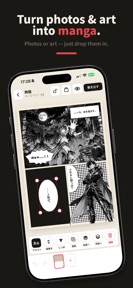


Manga Maker: Photo Comics is a panel-based comic creation tool for iOS that converts personal photos into manga-style layouts.
The App DNA
What makes this app unique?
The app removes the technical friction of manual drawing, allowing users to focus on storytelling through automated subject extraction and template-based composition.
For Casual creators and hobbyists looking to convert personal photos or illustrations into manga-style comics without manual drawing.
What does it look like?
Key features
Drag-and-drop interface for splitting and merging panels with custom template saving.
One-tap background removal to isolate subjects for placement as comic characters.
Unlocks high-resolution output, PDF generation, and comic-file backups for multi-page projects.
How much does it cost?
The one-time purchase model gates professional output quality and project capacity, acting as the primary conversion lever.
Velocity
Maintenance developmentUX improvementsnew contentShow more...
With only one release in the observed window and a last update 26 days ago, the app operates at a maintenance cadence. The latest version focuses on UX improvements and productivity features, such as template management and enhanced photo editing tools. Development appears stable but infrequent, prioritizing feature-rich updates over rapid iteration. There is no evidence of a live-ops strategy or frequent content rotation.
Who built it?

User Sentiment
What do users think recently?
How are ratings & reviews evolving?
Not enough recent reviews to extract reliable themes yet.
Read the full review analysisCompetition
Competitive landscape for Manga Maker: Photo Comics
How's the Photo & Video market?
Manga Maker: Photo Comics operates in the Photo & Video category with a focus on specialized comic-layout workflows. The current freemium structure balances accessibility for casual users with a clear one-time upgrade path for power users.
Read the market outlookThe rivals identified
Unlock the deeper market read.
Access the full report for freeThe Analyst's Read
Key takeaways for Manga Maker: Photo Comics
Where is it heading?
The casual comic-creation market is shifting toward project-based workflows that require consistent, multi-page support. Manga Maker: Photo Comics is currently positioned as a niche utility, but its reliance on a one-time purchase model limits the capital available for rapid feature iteration against larger photo-editing competitors.
- The latest release (v1.2.0) adds library backups and templates, showing active investment in project-based retention rather than just single-page utility.
- The app maintains a maintenance-level release cadence, which limits its ability to respond quickly to AI-tooling advancements in the broader photo-editing market.
The SWOT
- One-tap subject extraction enables rapid scene building from personal photos.
- Reusable layout templates allow for consistent multi-page project creation.
- Adding social-sharing hooks for finished pages could drive organic discovery among manga hobbyists.
- Implementing a subscription tier for cloud-synced assets would increase recurring revenue potential.
Next best moves
Expand free tier to three pages because the single-page limit prevents long-form storytelling → increase Pro conversion rate
+ 1 more prioritized moveThe counter-intuitive read
The one-time purchase model is a liability…
Read the full takeSince the last report: The product strategy has pivoted toward addressing the conversion barrier created by the single-page free limit, with a new emphasis on long-form storytelling as the primary value proposition for Pro users.
Bottom line
Manga Maker: Photo Comics succeeds by lowering the barrier to comic creation through automated subject isolation, but the single-page limit in the free tier creates a hard ceiling on user retention: shifting to a multi-page free model would unlock the storytelling loop necessary to drive Pro conversions.
Unlock 2 critical frictions, 1 market threat, 1 more prioritized move and the analyst’s take.
Access the full report for freeFAQ
Is Manga Maker: Photo Comics free to use?
Can I use my own photos to make comics?
Does Manga Maker: Photo Comics require an internet connection?
Sources
- [1] App Store
Report last updated