


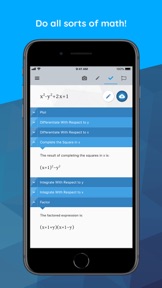


Maple Calculator is an education-focused math solver for high school and university students that provides step-by-step solutions and 2D/3D graphing on iOS and Android.
The App DNA
What makes this app unique?
Students use the app to solve complex homework problems and visualize mathematical concepts, replacing manual calculation and static textbook diagrams with an interactive engine.
For High school and university students requiring advanced mathematical computation and homework assistance.
What does it look like?
Key features
Performs symbolic math, calculus, and matrix operations for university-level problems, serving as the primary retention hook.
Captures handwritten or printed math problems for instant solving, reducing entry friction.
Sends handwritten steps to the web platform to identify errors and share work, acting as a B2B distribution barrier.
How much does it cost?
The app serves as a lead-generation tool for the developer's paid desktop software and educational platforms.
Velocity
Maintenance developmentUX improvementsnew contentShow more...
The app currently operates at a maintenance cadence, with only one release shipped in the last 69 days. Development is infrequent, and the latest release focused on minor functional adjustments rather than significant feature expansion. There is no evidence of a live-ops strategy or high-frequency iteration. The current pace suggests a stable, low-intensity development cycle.
Who built it?
User Sentiment
What do users think recently?
The recent review mood reads excited. Users appreciate visualizing complex mathematical equations and graphs helps students grasp difficult concepts during university coursework and the latest update improves workflow by allowing users to access calculation history and manage multiple expressions, but report ui elements display broken or garbled text strings on specific mobile devices, hindering navigation and usability.
How are ratings & reviews evolving?
What users say, by theme
- Visualizing complex mathematical equations and graphs helps students grasp difficult concepts during university coursework
- The latest update improves workflow by allowing users to access calculation history and manage multiple expressions
- The Try Another feature provides additional problem-solving support directly within the results and editor context
- UI elements display broken or garbled text strings on specific mobile devices, hindering navigation and usability
50 of 50 recent reviews analyzed · high confidence · Excited overall
Read the full review analysisUnlock 2 more frustration themes and 2 user requests, each backed by review evidence.
Access the full report for freeCompetition
Competitive landscape for Maple Calculator: Math Solver
How's the Education market?
Maple Calculator holds a 4.69 rating on iOS across 1,522 reviews, positioning it as a specialized utility in the Education category. The high rating relative to the niche math-solver space suggests strong product-market fit for its computational engine, despite UI-related friction.
Read the market outlookThe rivals identified
Unlock the deeper market read.
Access the full report for freeThe Analyst's Read
Key takeaways for Maple Calculator: Math Solver
Where is it heading?
The education utility market is consolidating around tools that offer seamless cross-platform experiences, and Maple Calculator's current UI inconsistencies leave it vulnerable to more stable rivals. If the team does not resolve the Android text rendering and orientation issues, the app risks losing its position as a primary homework tool for university students.
- The latest release (v4.3.3) adds persistent calculation history, demonstrating that the team is actively iterating on the core student workflow.
- UI text rendering issues on Android devices remain unresolved, which compounds the frustration of users already sensitive to monetization barriers.
The SWOT
- Maple math engine provides symbolic computation barrier
- Camera-based entry reduces homework friction
- Maple Learn integration enables error identification
- Dark mode implementation for visual accessibility
- Desktop version for computer-based study sessions
Next best moves
Audit Android UI text rendering because garbled labels hinder navigation → improve retention
+ 1 more prioritized moveThe counter-intuitive read
The aggressive monetization of basic features is a…
Read the full takeSince the last report: The app remains in a maintenance-mode development cycle with no new features or pricing changes. The primary shift is an increased focus on the competitive risk posed by UI instability and the potential for user churn to more polished alternatives.
Bottom line
Maple Calculator's computational engine provides a defensible advantage, but UI regressions and aggressive monetization barriers currently erode user trust. Prioritizing stability and accessibility would protect the user base from churn to more polished educational tools.
Unlock 3 critical frictions, 2 market threats, 1 more prioritized move and the analyst’s take.
Access the full report for freeFAQ
Is Maple Calculator free to use?
Does Maple Calculator work offline?
Can I use Maple Calculator on my computer?
Sources
- [1] Play Store listing, source
Report last updated