


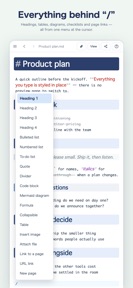


Markdown Editor - Notes is a cross-platform Markdown authoring tool for Mac, iPad, and web that renders documents in real-time.
The App DNA
What makes this app unique?
The app removes the cognitive friction of switching between edit and preview modes, serving users who need to draft technical documentation directly in their existing Google Drive folders.
For Markdown users and professionals who require a cross-platform note-taking tool that integrates with their existing Google Drive storage.
What does it look like?
Key features
Renders headings, tables, and checklists in real-time without a separate preview pane.
Stores files directly in the user's Google Drive folder structure without proprietary formats.
Renders flowcharts and sequence diagrams inline using Mermaid syntax.
How much does it cost?
The app operates on a free model with no monetization, relying on the developer's existing infrastructure and Google Drive for storage.
Velocity
Maintenance developmentUX improvementsperformanceShow more...
Markdown Editor - Notes maintains a maintenance-level cadence, shipping 2 releases over the observed window. Development is currently focused on resolving minor UI bugs, such as cursor positioning and interaction issues with table elements. There is no evidence of new feature development or live operations. The current pace of updates suggests a focus on stability rather than expansion.
Who built it?
User Sentiment
What do users think recently?
How are ratings & reviews evolving?
Not enough recent reviews to extract reliable themes yet.
Read the full review analysisCompetition
Competitive landscape for Markdown Editor - Notes
How's the Productivity market?
Markdown Editor - Notes occupies a niche utility position, focusing on file portability via Google Drive rather than the subscription-based feature bloat common in the productivity category.
Read the market outlookThe rivals identified
Unlock the deeper market read.
Access the full report for freeThe Analyst's Read
Key takeaways for Markdown Editor - Notes
Where is it heading?
The productivity market is consolidating around subscription-based feature sets, leaving Markdown Editor - Notes in a stable, utility-focused position. Its reliance on Google Drive storage serves as a long-term retention mechanism for users who prioritize file portability over proprietary ecosystems.
- The maintenance-only release cadence indicates the developer is not prioritizing aggressive growth, which keeps the app in a stable, utility-focused state.
The SWOT
- Real-time WYSIWYG rendering removes cognitive friction.
- Native Google Drive integration enables file portability.
- Paid tier for advanced features could unlock revenue.
- Expanded Mermaid diagram support targets technical documentation.
Next best moves
Audit offline-first storage capabilities because the current dependency on Google Drive limits session reliability in low-connectivity environments → increase user retention.
The counter-intuitive read
The lack of a subscription model is not…
Read the full takeSince the last report: Strategic framing has shifted to acknowledge the lack of monetization as a risk to long-term development, while simultaneously positioning the absence of subscription bloat as a competitive advantage.
Bottom line
The app's reliance on Google Drive storage is a strong differentiator for users who fear proprietary lock-in. Prioritizing offline-first storage would address the primary session reliability risk, securing the app's position against cloud-dependent rivals.
Unlock 2 critical frictions, 1 market threat and the analyst’s take.
Access the full report for freeFAQ
Is Markdown Editor - Notes free to use?
Does Markdown Editor - Notes work offline?
What is the main difference between this and other Markdown editors?
Sources
- [1] App Store, source
Report last updated