





MediaHarbor is a local media player for iOS that connects directly to SMB servers to browse and play photos and videos without cloud uploads.
The App DNA
What makes this app unique?
It removes the friction of mounting network drives in the Files app, serving users who want to keep their media on their own hardware.
For NAS owners and local media enthusiasts who require a private, cloud-free interface for viewing photos and videos on iOS.
What does it look like?
Key features
Connects directly to SMB shares without mounting in the Files app.
Uses native iOS player and integrated VLC engine for broad format compatibility.
Visual media browser with pinch-to-resize columns and date-grouped headers.
How much does it cost?
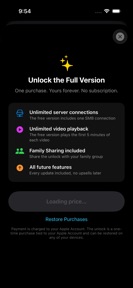
The freemium model uses a functional trial gate to convert users to a one-time lifetime purchase.
Velocity
Maintenance developmentopaqueShow more...
The app shows a maintenance-level cadence with only one release recorded in the analyzed window. As the initial version, there is no established history of feature updates or iterative development. Future development trends remain unclear until subsequent updates are released to establish a baseline frequency.
Who built it?
Ian Marrero Falcon
2 apps tracked · Photo & Video
 VA Compensation Calculator
User Sentiment
What do users think recently?
How are ratings & reviews evolving?
Not enough recent reviews to extract reliable themes yet.
Read the full review analysisCompetition
Competitive landscape for MediaHarbor: NAS Media Player
How's the Photo & Video market?
MediaHarbor serves the niche of private, local-first media management on iOS. With a 5.0 rating from a single initial review, the app currently lacks the scale to challenge broader media players in the Photo & Video category.
Read the market outlookThe rivals identified
Unlock the deeper market read.
Access the full report for freeThe Analyst's Read
Key takeaways for MediaHarbor: NAS Media Player
Where is it heading?
Users report: The market for local-first media players is consolidating around apps that provide stable, multi-format playback without cloud dependency. MediaHarbor is positioned to capture privacy-conscious users, but the lack of recent updates risks stagnation as competitors iterate on their own playback engines.
- The app remains in a maintenance-mode cadence with no updates since launch, signaling a focus on stability over feature expansion.
The SWOT
- Direct SMB server connection removes cloud dependency
- Dual playback engines provide broad format compatibility
- Expanding free tier connections could lower adoption barriers
Next best moves
Expand free tier to two connections because the current single-connection limit is a top conversion friction point → increase top-of-funnel conversion
The counter-intuitive read
The lack of cloud features is MediaHarbor's primary retention lever…
Read the full takeSince the last report: The app's development status remains unchanged, but the product strategy has shifted toward lowering conversion barriers by expanding the free tier's connection limit.
Bottom line
MediaHarbor's direct SMB integration addresses the friction of cloud-dependent media management, but the current maintenance-mode cadence leaves the product vulnerable to competitors with more active development cycles.
Unlock 2 critical frictions, 1 market threat and the analyst’s take.
Access the full report for freeFAQ
Is MediaHarbor safe for my private photos?
Does MediaHarbor work with my NAS?
What is the difference between the free and paid versions?
Sources
- [1] App Store, source
Report last updated