


MindMap AI: Mind Map Maker
By Van Hiet Ho


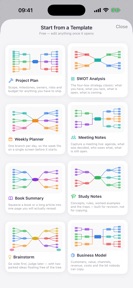


MindMap AI: Mind Map Maker is a productivity tool for iOS and Mac that generates and organizes visual mind maps from text, URLs, or manual input.
The App DNA
What makes this app unique?
The app removes the friction of account-based onboarding by utilizing user-owned iCloud storage, displacing tools that require proprietary sign-ups for basic functionality.
For Students, project planners, and professionals structuring complex information.
What does it look like?
Key features
Generates visual mind maps from topics, long text, or URLs.
Manual node creation and styling on an infinite workspace.
Syncs maps across Apple devices using user-owned iCloud storage.
How much does it cost?
The 3-map limit acts as a primary conversion lever for power users.
Velocity
Active developmentnew contentUX improvementsShow more...
The app is currently in an active development phase, shipping two releases within the last five days. Recent updates focus on enhancing core utility through improved file management, keyboard-driven node creation, and flexible cloud synchronization options. This cadence suggests a stable, feature-focused development cycle rather than a live-service model. The developer is actively iterating on user-requested productivity features to improve the mind-mapping workflow.
Who built it?
Van Hiet Ho
2 apps tracked · Productivity
 HairLens: Hairstyle Try On
User Sentiment
What do users think recently?
How are ratings & reviews evolving?
Not enough recent reviews to extract reliable themes yet.
Read the full review analysisCompetition
Competitive landscape for MindMap AI: Mind Map Maker
How's the Productivity market?
MindMap AI: Mind Map Maker occupies the productivity space with a focus on privacy and local-first data ownership. The current release cadence of two updates in five days suggests a high-velocity effort to build feature parity with established mind-mapping tools.
Read the market outlookThe rivals identified
Unlock the deeper market read.
Access the full report for freeThe Analyst's Read
Key takeaways for MindMap AI: Mind Map Maker
Where is it heading?
The productivity market is consolidating around tools that offer both AI-assisted generation and professional-grade collaboration. MindMap AI: Mind Map Maker is currently advantaged by its privacy-first architecture, but must address the conversion friction of its free tier to sustain growth against larger incumbents.
- The latest release cadence (two updates in five days) shows active feature investment, which will accelerate the path to professional-grade utility.
- The addition of account-based syncing alongside iCloud sync provides a flexible path for users to transition from local-only to cross-platform workflows.
The SWOT
- Privacy-first design via local-only storage and iCloud sync removes onboarding friction
- AI-driven map generation from URLs reduces cognitive load for research-heavy users
- Adding collaborative real-time editing could capture the project-planning segment
Next best moves
A/B test a 5-map free limit because the 3-map limit is a hard conversion wall → increase top-of-funnel retention
+ 1 more prioritized moveThe counter-intuitive read
The privacy-first local-only design is a stronger retention lever than the AI-generation feature…
Read the full takeSince the last report: The app has pivoted its strategic focus toward privacy-first, local-only architecture to differentiate from cloud-dependent incumbents, while simultaneously identifying collaborative real-time editing as the primary requirement for professional market entry.
Bottom line
MindMap AI: Mind Map Maker succeeds by lowering the barrier to entry through local-first privacy, but the 3-map limit risks capping the user base before they reach power-user status. A pivot toward collaborative features would unlock the professional project-planning segment.
Unlock 1 critical friction, 1 market threat, 1 more prioritized move and the analyst’s take.
Access the full report for freeFAQ
Is MindMap AI: Mind Map Maker free to use?
Does MindMap AI: Mind Map Maker require an account?
What is the difference between the free and Pro versions?
Can I use MindMap AI: Mind Map Maker offline?
Sources
- [1] App Store
- [2] Developer website, source
Report last updated