




Mobile Print:Scanner & Printer is a document management and wireless printing utility for iPhone and iPad users.
The App DNA
What makes this app unique?
It removes the need for desktop software and cables, allowing users to scan, edit, and print documents directly from their mobile device.
For iPhone and iPad users requiring a mobile-first solution for document scanning, PDF management, and wireless printing.
What does it look like?
Key features
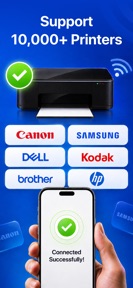
Automated detection of AirPrint-enabled printers on the local Wi-Fi network.
Extracts editable text from scanned documents or photos using on-device processing.
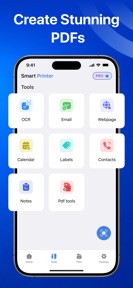
Suite for merging, signing, watermarking, and reordering PDF pages.
How much does it cost?
The freemium model gates advanced PDF and template features behind a subscription to incentivize conversion from the ad-supported free tier.
Velocity
Maintenance developmentnew contentUX improvementsShow more...
With only one release in the analyzed window, the app operates on a maintenance cadence. The latest version focuses on feature expansion, including wireless printer discovery, OCR scanning, and a PDF toolkit. Development appears to be in an early stage or focused on infrequent, feature-heavy updates rather than iterative cycles. Future momentum will depend on whether this initial release is followed by regular performance patches or feature refinements.
Who built it?
User Sentiment
What do users think recently?
How are ratings & reviews evolving?
Not enough recent reviews to extract reliable themes yet.
Read the full review analysisCompetition
Competitive landscape for Mobile Print:Scanner & Printer
How's the Business market?
Mobile Print:Scanner & Printer competes in the Business category, offering a mobile-first utility that bypasses the need for desktop drivers. The 17+ content rating creates a barrier to entry for the student segment, which is a key demographic for mobile document scanning tools.
Read the market outlookThe rivals identified
Unlock the deeper market read.
Access the full report for freeThe Analyst's Read
Key takeaways for Mobile Print:Scanner & Printer
Where is it heading?
The mobile document utility market is shifting toward all-in-one solutions that combine scanning, editing, and printing. Mobile Print:Scanner & Printer is well-positioned with its current feature set, but it must increase its update cadence to match the feature-parity expectations of the broader Business category.
- The latest release (v1.0.2) adds core utility features like OCR and PDF management, which are essential for competing in the mobile-first document space.
- The app is currently in a maintenance-mode cadence, with only one major update in the recent window, requiring more frequent feature iteration to remain competitive.
The SWOT
- One-tap printer discovery reduces technical friction
- On-device OCR processing enables offline text extraction
- Localized pricing could capture international market share
Next best moves
Adjust content rating to lower threshold because the current 17+ rating restricts student-segment access → increase install velocity
The counter-intuitive read
The 17+ content rating is a self-imposed barrier…
Read the full takeSince the last report: The app's positioning shifted from a focus on hardware-dependent utility to an analysis of demographic barriers caused by its 17+ content rating. This change highlights a strategic gap in reaching the student segment.
Bottom line
Mobile Print:Scanner & Printer secures utility through its one-tap discovery mechanism, but the 17+ content rating limits its reach in the education segment. Prioritizing a broader age-appropriate rating would unlock the student demographic, which is the primary driver for mobile-first document scanning and printing tools.
Unlock 1 critical friction, 1 market threat and the analyst’s take.
Access the full report for freeFAQ
Is Mobile Print:Scanner & Printer compatible with all printers?
Does Mobile Print:Scanner & Printer offer a free version?
Is Mobile Print:Scanner & Printer safe for children to use?
Sources
- [1] App Store, source
Report last updated