


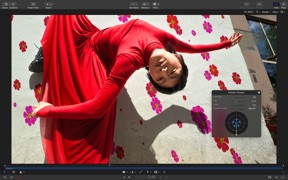

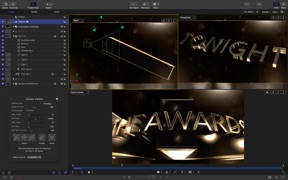
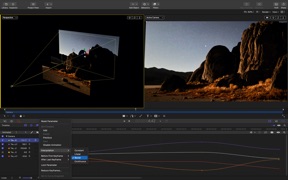


Motion is a professional motion graphics and effects tool for video editors on macOS, bundled within the Apple Creator Studio suite.
Product velocity
Maintenance
Daily rank 🇺🇸
—
Photo & Video
Sentiment
—
—
Nemesis

Stop Motion Studio Pro
The App DNA
What makes this app unique?
Users hire Motion to execute complex 2D and 3D animation tasks that require precise control over keyframes and object tracking, which template-based mobile apps fail to provide.
For Video editors and content creators ranging from beginners to professionals using Mac and iPad hardware.
What does it look like?
Key features
Uses machine learning to automatically isolate people and objects from backgrounds without manual rotoscoping.
Automatically detects and matches movement of faces or objects to attach effects and titles.
Analyzes music to map song parts and beats in a grid for automatic clip syncing.
How much does it cost?
Subscription model anchored at $12.99/month, bundling multiple creative apps to increase average revenue per user.
Velocity
Maintenance developmentperformanceUX improvementsShow more...
With only one release identified in the observed data, the app is currently operating at a maintenance cadence. The latest update prioritizes stability and bug fixes, alongside previously added AI-powered masking and 3D text rendering improvements. There is no evidence of a recurring live-ops schedule or a high-frequency feature release cycle. Development appears focused on platform-specific performance optimization rather than rapid iteration.
Who built it?
Jatisari Inovasi Studio
13+ apps tracked · Photo & Video
 Apple Sports
 Apple Invites
 Apple Music Classical
 Pixelmator Classic iOS
 Final Cut Camera
 Bahrain Calendar 2026
 South African Calendar
 Pakistan Quiz Mania
 Kuis Indonesia Hebat
 Österreich Kalender 2026
 Czech Calendar 2025
 Eesti Kalender 2026
User Sentiment
What do users think recently?
How are ratings & reviews evolving?
Not enough recent reviews to extract reliable themes yet.
Read the full review analysisCompetition
Competitive landscape for Motion: Animate Effects
How's the Photo & Video market?
Motion operates as a professional-grade creative tool within the Apple ecosystem, targeting users who require deep integration with Final Cut Pro. Its value is tied to the $12.99/month subscription suite, which positions it against standalone mobile animation apps that lack professional-grade masking and tracking capabilities.
Read the market outlookThe rivals identified
By CATEATER, LLC
This app is the primary nemesis because it dominates the niche stop-motion market with specialized hardware support that directly challenges Motion's creative video positioning.
- Offers dedicated DSLR camera support for professional-grade capture which Motion currently lacks in its workflow
- Provides a robust remote camera feature allowing users to control capture from a secondary mobile device
- Features specialized chroma key tools specifically optimized for stop-motion animation rather than general video editing
 OSnap! Lapse & MotionContender
 Animation CreatorContender
 JigglyPaint: Draw/Shake/Share!Contender
 5SecondsApp - GIF MakerContender
Unlock the head-to-head verdict: where this rival wins, and where it loses.
Access the full report for freeThe Analyst's Read
Key takeaways for Motion: Animate Effects
Where is it heading?
The creative video market is consolidating around automated, template-based workflows that prioritize speed over manual precision. Motion remains advantaged for professional editors, but its lack of casual-friendly capture tools leaves it exposed to AI-driven entrants, so the PM must prioritize hardware-integrated capture to defend the professional base.
- Recent updates focus on professional-grade stability rather than casual-user feature expansion, signaling a commitment to the core pro-editor base.
- The emergence of template-heavy AI video generators pulls casual-user attention away from manual tools, increasing churn pressure on the entry-level segment.
The SWOT
- Professional-grade masking and tracking tools enable high-fidelity output
- Deep integration with Final Cut Pro creates a sticky professional workflow
- Expanding B2B partnerships with educational institutions could drive volume
- Adding wearable companion apps for remote monitoring would bridge the capture gap
Next best moves
Ship native DSLR camera support because Stop Motion Studio Pro uses this to siphon professional users → increase professional user retention.
The counter-intuitive read
The Mac-only constraint is not a weakness but…
Read the full takeFeature gaps
Dedicated DSLR camera support (available in Stop Motion Studio Pro but missing here) +1
Since the last report: Motion pivoted its competitive strategy to address gaps in professional capture hardware while acknowledging increased churn pressure from AI-driven template competitors.
Bottom line
Motion holds its professional lead through deep Final Cut Pro integration but bleeds casual creators to template-heavy AI alternatives, so revenue growth hinges on bridging the professional capture gap to neutralize niche rivals.
Unlock 2 critical frictions, 2 market threats and the analyst’s take.
Access the full report for freeReport last updated