Report updated May 31, 2026

MultipleTimers+ is an established productivity app that is free with in-app purchases. With a 4.7/5 rating from 138 reviews, it shows polarized user reception. Users particularly appreciate multi-timer functionality allows users to manage complex workflows like irrigation or therapy sessions, though ui misalignment issues persist on devices with enlarged font settings despite recent updates remains a common concern.

What is MultipleTimers+?

MultipleTimers+ is a productivity utility for iOS that enables simultaneous countdowns and category-based presets.

Users hire this app to manage complex, multi-step workflows that standard single-timer tools cannot accommodate, reducing the cognitive load of manual task switching.

Current Momentum

v2.3 · 2mo ago

Active
  • Fixed UI misalignment in latest release.
  • Maintains stable, low-frequency update cadence.

Active Nemesis

MultiTimer: Multiple timers

MultiTimer: Multiple timers

By Sergey Astakhov

Other Rivals

Interval Timer
Timer ٞ
Forest: Focus for Productivity
Clock
Toggl Track: Hours & Time Log
Flow: Focus & Pomodoro Timer

7-Day Rank Pulse 🇺🇸

Productivity

No ranking data

Rating Pulse 🇺🇸

Recent User Mood

What makes this app unique?

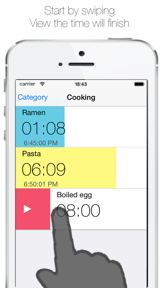
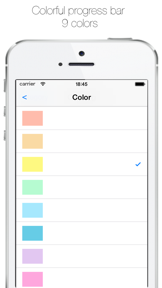
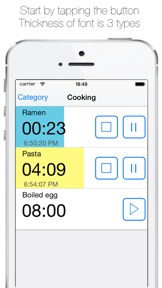
What Does It Look Like?

What Are The Key Features?

Multiple Concurrent TimersStandard

Executes multiple independent timers simultaneously with second-level precision

Category-Based Timer PresetsDifferentiator

Saves timer configurations into user-defined categories for one-tap access

How much does it cost?

Freemium
  • Free tier with ad-supported interface
  • Pro version (IAP) for ad-free experience

Freemium model uses ad-insertion as the primary monetization mechanism for the free tier, with a single IAP gate for ad removal.

Who Built It?

EIICHI KOMINE app icon 1
EIICHI KOMINE app icon 2
EIICHI KOMINE app icon 3
EIICHI KOMINE app icon 4

EIICHI KOMINE

(218)

Providing minimalist, high-speed utility tools for professionals and individuals to manage time, tasks, and data. Focused on frictionless productivity through simple, single-purpose mobile applications.

Portfolio

13

Apps

Free 11Paid 1
Productivity42%
Business17%
Games17%

Explore the full EIICHI KOMINE report

Portfolio breakdown, audience, momentum, and every app published by EIICHI KOMINE.

Go deeper

What do users think recently?

Low confidence · 16 reviews analyzed

How did the latest release land?

Overall
4.7/ 5
(138)
Current version
4.7/ 5
0.0 vs overall
(138)
Main signal post-update: multi-timer functionality allows users to manage complex workflows like irrigation or therapy sessions.

What is the recent mood?

Mixed

Recent user voice shows a mixed sentiment. Users appreciate multi-timer functionality allows users to manage complex workflows like irrigation or therapy sessions, but report ui misalignment issues persist on devices with enlarged font settings despite recent updates.

Limited review volume (16 reviews). Sentiment analysis will deepen as more data lands.

View the full user-sentiment analysis

Mood gauge, ratings & review-volume history, every praise / complaint / request, and sentiment over time.

Go deeper

What is the competitive landscape for MultipleTimers+?

How's The Productivity Market?

Market outlook for this category

Available very soon

The rivals identified

Nemeses(1)

MultiTimer: Multiple timers icon

Sergey Astakhov

4.7(15.4K)

With over 15,000 reviews and a high-frequency update cadence, this app dominates the specific niche of concurrent timer management.

Differentiators

  • Offers advanced concurrent timer management that scales far beyond basic single-task productivity tools.
  • Maintains a high-velocity release schedule with four updates in the last six months alone.
  • Provides a specialized UI optimized for managing multiple simultaneous countdowns without screen clutter.

Head to head

The target app must prioritize its 'one-tap' simplicity to defend against this feature-heavy incumbent, or risk being squeezed out by the nemesis's superior depth.

Contenders(2)

Timer ٞ icon
Timer ٞmoat: low

UniCom Technology

4.4(1.1K)

A direct functional alternative that occupies the same utility-focused timer space with a similar feature set.

Differentiators

  • Provides a stripped-back, utility-first experience that avoids the bloat of modern productivity suites.
  • Targets users who prefer a dedicated, single-purpose tool rather than a multi-category productivity app.
Interval Timer icon
Interval Timermoat: medium

Lukas Freudenmann

4.7(3.2K)

Directly competes for the same 'timed activity' audience by focusing on sports and fitness-specific interval workflows.

Differentiators

  • Specializes in high-intensity interval training (HIIT) workflows that require specific audio-visual cues.
  • Targets a distinct fitness-oriented user base that prioritizes physical performance over general productivity.

Same space(3)

Clock icon
Clockmoat: high

Apple

3.9(341.1K)

The default system-level utility that provides baseline timer functionality for all iOS users.

Differentiators

  • Provides zero-friction, system-level integration that third-party apps cannot replicate in terms of accessibility.
  • Offers deep OS-level hardware integration, including lock-screen widgets and control center access.
Toggl Track: Hours & Time Log icon

Toggl OÜ

4.8(9.3K)

Adjacent competitor that shifts the focus from simple timers to professional time-tracking and reporting.

Differentiators

  • Offers robust cross-platform reporting and data analytics for professional time management and billing.
  • Integrates with enterprise-grade project management tools, moving beyond simple personal timer utility.
Forest: Focus for Productivity icon

SEEKRTECH CO., LTD.

4.4(806.7K)

An adjacent productivity giant that uses gamification to solve the same 'focus' problem as the target app.

Differentiators

  • Uses deep gamification and virtual forest building to incentivize focus sessions rather than simple countdowns.
  • Leverages a massive, established brand ecosystem that creates high switching costs for loyal users.

New entrants(1)

Flow: Focus & Pomodoro Timer icon

Yugen GmbH

4.7(164.9K)

A highly popular, design-forward productivity tool that captures the modern aesthetic-focused user segment.

Differentiators

  • Prioritizes minimalist, high-end design language to differentiate from cluttered, utility-heavy timer applications.
  • Focuses on the Pomodoro technique as a specific, actionable productivity framework rather than generic timing.

Compare MultipleTimers+ against every rival

All rivals in one side-by-side table — identity, store metrics, ratings & sentiment, and strategic intel — plus a head-to-head page for each.

Go deeper

The outtake for MultipleTimers+

Strengths to defend, gaps to attack

Core Strengths

  • One-tap category presets reduce task-initiation friction
  • Concurrent timer engine supports complex professional workflows

Critical Frictions

  • UI misalignment on enlarged fonts
  • Lack of dark mode
  • Inconsistent alarm volume tied to device settings

Growth Levers

  • B2B integration for professional therapy or irrigation workflows
  • Dark mode implementation to address visibility gap

Market Threats

  • MultiTimer's high-frequency update cadence
  • OS-level integration of default Clock app
  • Design-forward Pomodoro tools like Flow

What are the next best moves?

highInvest

Rebuild UI layout engine because font-scaling regressions erode the daily active habit → stabilize retention

UI misalignment is the #1 complaint theme in recent reviews.

Trade-off: Push dark mode implementation to Q3 — accessibility parity outweighs aesthetic requests.

mediumMaintain

Audit alarm volume logic because users report missing alerts → reduce churn

Inconsistent alarm volume is a top-three frustration theme.

Trade-off: Same-quarter capacity available — no major lever displaced.

A counter-intuitive read

The app's lack of complex features is its primary moat, as it avoids the bloat that makes professional rivals like Toggl Track inaccessible for casual daily tasks.

Feature Gaps vs Competitors

  • Dark mode (available in Flow but missing here)
  • Independent volume control (available in MultiTimer but missing here)

Key Takeaways

MultipleTimers+ retains power users through its concurrent timer engine, but persistent UI regressions on accessibility settings threaten its core utility, so the PM must prioritize accessibility fixes to defend against design-forward rivals.

Where Is It Heading?

Mixed Signals

The casual timer market is consolidating around high-frequency update cadences, leaving maintenance-mode apps exposed to churn. The target app must stabilize its UI to retain its professional user base before the lack of feature parity with rivals like MultiTimer leads to a permanent decline in chart performance.

UI regressions in the latest update (disappearing labels) erode the daily active habit, which compounds the rating drag already visible on Android.

The core concurrent-timer utility remains a high-retention driver for professional users, providing a stable base for future monetization experiments.

Disclosure: Independent intel to help mobile builders succeed.

AI-powered analysis with editorial review, built from publicly available sources. Marlvel.ai is not affiliated with, endorsed by, or sponsored by MultipleTimers+, its developer, the app publisher, Apple, or Google Play. All trademarks, logos, and screenshots referenced remain the property of their respective owners.

What's new

The app transitioned to a freemium monetization model and is currently experiencing negative sentiment due to persistent UI accessibility regressions.

shifted

Freemium Monetization

declined

UI Regression Complaints

improved

Preset Repositioning

added

Expanded SWOT Analysis

Cite this report

Marlvel.ai. “MultipleTimers+ Intelligence Report.” Updated May 31, 2026. https://marlvel.ai/apps/multipletimers

Agent Markdown (.md)See methodologyContact support

Data licensed under CC-BY-NC 4.0