


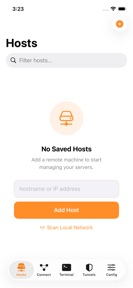

My Console is a multi-session SSH terminal client for iOS that allows developers to manage remote Linux, macOS, and Windows servers.
The App DNA
What makes this app unique?
The tool removes the friction of managing remote server sessions from mobile devices by maintaining persistent connections during network transitions.
For System administrators and developers who need to manage remote servers from mobile devices.
What does it look like?
Key features
Restores SSH sessions automatically when network connectivity drops, maintaining session state.
Supports simultaneous SSH connections to Linux, macOS, and Windows machines.
Manages multiple active terminal sessions within a single interface.
How much does it cost?
The app utilizes a freemium model with in-app purchases, though specific tier pricing is not disclosed.
Velocity
Maintenance developmentperformanceShow more...
The app is currently in a maintenance phase, having shipped only one minor update in the last 128 days. Development activity is limited to addressing specific technical issues, such as in-app purchase stability, rather than introducing new features or content. With a cadence of approximately one release every four months, the development momentum is low. There is no evidence of live operations or recurring content updates.
Who built it?
Saed Zakari
5 apps tracked · Utilities
 ProxRemote - Proxmox Manager
 ReadLogs
 Cable Guide: DIY & Pinouts
 MyIPTV Stream Player
User Sentiment
What do users think recently?
How are ratings & reviews evolving?
Not enough recent reviews to extract reliable themes yet.
Read the full review analysisCompetition
Competitive landscape for My Console
How's the Utilities market?
My Console occupies the mobile SSH utility space with a focus on session persistence. The lack of recent updates (128 days since last store update) suggests a maintenance-mode position rather than active growth.
Read the market outlookThe rivals identified
Unlock the deeper market read.
Access the full report for freeThe Analyst's Read
Key takeaways for My Console
Where is it heading?
The mobile SSH utility market is consolidating around tools that offer frequent updates and modern terminal features. My Console remains in a maintenance-only posture, which limits its ability to capture new users or defend its base against more active rivals.
- The 128-day update gap indicates a maintenance-only cadence, which risks losing power users to more actively supported terminal clients.
- Automatic reconnection remains a core retention lever that provides utility value despite the lack of recent feature expansion.
The SWOT
- Automatic reconnection maintains session state during mobile network transitions
- Feature-led differentiation in a stagnant mobile SSH utility market
Next best moves
Audit current codebase for stability because the 128-day update gap risks user churn → maintain baseline retention
The counter-intuitive read
The lack of updates is a strategic vulnerability: in a utility-focused market…
Read the full takeBottom line
My Console relies on automatic reconnection to retain its power-user base, but the 128-day update gap threatens this position. Maintaining current stability is the only way to prevent churn until a clear feature-led growth path is established.
Unlock 1 critical friction, 1 market threat and the analyst’s take.
Access the full report for freeFAQ
Is My Console suitable for managing multiple servers?
Does My Console work when my internet connection drops?
Is My Console free to use?
Sources
- [1] App Store, source
Report last updated